Biometric Attendance Kiosk Setup in India: How Small Businesses Can Run Fast Clock-Ins Across Office, Factory and Store Locations
Biometric attendance kiosks in India help small businesses record staff attendance quickly at a fixed location using fingerprint or face-based.
The HelloTime team
12 min read
On this page
Biometric attendance kiosks in India help small businesses record staff attendance quickly at a fixed location using fingerprint or face-based check-in. They work well for offices, factories, shops and sites where you need a simple, shared clock-in point and cleaner attendance records than paper registers or WhatsApp messages.
If you run multiple branches or shifts, a kiosk setup can reduce buddy punching, shorten entry queues and give HR a single attendance trail for payroll and leave. The key is to choose the right device, place it correctly, set clear policies and connect attendance to timesheets, approvals and payroll.
Key takeaways
- A biometric attendance kiosk India setup is best for fixed-location teams with shift-based attendance.
- Face recognition kiosks are often easier to manage than fingerprint devices in dusty, high-touch or fast-moving environments.
- Good setup matters as much as the device. Placement, power backup, internet and shift rules decide day-to-day success.
- Attendance data should flow into timesheets, leave and payroll to avoid manual rework.
- Because biometric data is sensitive personal data, businesses should handle collection and storage carefully and take informed consent where appropriate.
- Start with one location, test queue time and exceptions, then roll out to all branches.
Why are more small businesses in India switching to biometric kiosks?
They want faster attendance, fewer disputes and less manual work. A kiosk gives one controlled clock-in point and creates a clear record for shifts, late marks, overtime review and payroll.
Many Indian small businesses still run attendance on paper, Excel sheets or supervisor messages on WhatsApp. That works until the team grows, shifts become uneven or branches spread across locations. A retail chain in Pune may have one opening shift and one closing shift. A fabrication unit near Bengaluru may run three shifts. A consulting back office in Mumbai may need office attendance plus project hours. In each case, attendance errors become expensive.
A biometric kiosk fixes one major issue first. It captures who checked in, where they checked in and when they checked in. That single source of truth helps HR and operations answer routine questions quickly:
- Was the employee present on 14/08/2026?
- Which shift did they report for?
- Did they clock in at the assigned location?
- Was there a missed punch?
- How many attendance exceptions need review before payroll?
For many businesses, the real gain is not just attendance capture. It is what happens after capture. Once check-ins flow into attendance reports, leave balances, overtime review and payroll inputs, the month-end process becomes much smoother.
What is a biometric attendance kiosk?
A biometric attendance kiosk is a shared device placed at a workplace entrance, reception, shop floor gate or staff room. Employees clock in and out using biometric identity, usually fingerprint or facial recognition, instead of signing a register.
In practical terms, the kiosk can be:
- A dedicated tablet kiosk with face recognition
- A wall-mounted device at the branch entrance
- A staff attendance terminal at a factory gate
- A front-desk check-in point for office teams
For small businesses in India, face-based kiosks are becoming more common because they support fast check-ins and avoid some of the issues of fingerprint scanning, such as poor reads from wet hands, dust, grease or worn fingerprints. This is especially relevant for manufacturing, kitchens, warehouses and field teams returning to base.
An ai biometric attendance system can also help with photo matching, duplicate prevention and smoother recognition in real-world lighting. The goal is not to add complexity. The goal is to reduce queues and improve attendance quality.
Where does a kiosk setup work best?
A kiosk setup works best where employees report to a fixed place to start work. Common examples include:
Offices
Small and mid-sized offices often want a clean attendance process at reception or near the main door. This suits admin teams, support teams, finance departments and back-office operations.
Factories and workshops
Factories need fast check-ins at shift changes. The right kiosk can reduce crowding at entry points and maintain a reliable in-time record for each shift.
Retail stores
Stores often have small teams but frequent shift changes. A simple kiosk near the staff area helps store managers avoid paper attendance and end-of-month reconciliation.
Hospitality venues
Restaurants, cafes and budget hotels usually manage multiple roles and changing rosters. A kiosk near the staff entry point makes opening and closing shift records easier to verify.
Construction and field-service base locations
Some teams start at a depot, warehouse or site office before moving out. A kiosk can record initial attendance there, while GPS or geofenced clock-ins may be more suitable once teams are in the field.
How do you choose between fingerprint and face recognition?
For many small businesses in India, face recognition is easier to operate at scale. It is fast, touch-free and usually better for dusty, oily or high-volume environments.
Fingerprint devices can still work well in controlled office settings. But in many real operations, face recognition often performs better because it reduces contact, cleaning needs and failed scans during shift rush.
When choosing, compare these points:
1. Queue speed
At shift start, a few extra seconds per employee can create a long line. Face recognition usually helps faster throughput when many employees arrive together.
2. Work environment
Factories, kitchens and workshops often make fingerprint reading harder. Dust, moisture and worn fingertips can increase failed attempts.
3. Hygiene and device care
Touch-free check-in reduces surface contact. That can simplify maintenance in high-footfall locations.
4. Lighting and placement
Face systems need sensible lighting and camera angle. A kiosk facing direct sunlight or a glass entrance may perform poorly.
5. Employee onboarding
Fingerprint devices need clear enrolment and repeated capture quality checks. Face enrolment should also be done carefully, with consistent photos and clear instructions.
6. Privacy handling
Biometric data needs careful handling. Your policy, employee notice and access controls matter as much as device choice.
What do you need before installing a kiosk?
You need a clear attendance policy, the right placement, stable power and a process for exceptions. Without these basics, even a good device will create daily confusion.
Before buying or rolling out devices, create a simple setup checklist.
Attendance policy
Document the rules in plain English:
- Which staff must use the kiosk
- Which location they should use
- Clock-in and clock-out rules
- Grace periods, if any
- Shift assignment process
- Missed punch correction process
- Approval owner for exceptions
- Treatment of visitors, trainees and temporary staff
Keep policy language practical. Staff should understand it in one reading.
Site readiness
Check each location for:
- Reliable power supply
- Basic power backup, if needed
- Stable internet or sync method
- Safe mounting height
- Good employee flow near the device
- Enough lighting for face recognition
- Protection from dust, heat and rain where relevant
Data handling process
Biometric attendance involves sensitive personal data. In India, businesses should handle personal data responsibly and align internal practices with the Digital Personal Data Protection Act, 2023. This is general information, not legal advice. Keep collection limited, explain the purpose, restrict access and store only what you need for attendance operations.
Exception workflow
No setup is perfect on day one. Decide who will resolve:
- Failed recognitions
- Missed check-ins
- Wrong shift mapping
- Branch transfer punches
- Device downtime entries
If exception handling is weak, HR will end up rebuilding attendance in spreadsheets.
How do you set up a biometric attendance kiosk across multiple locations?
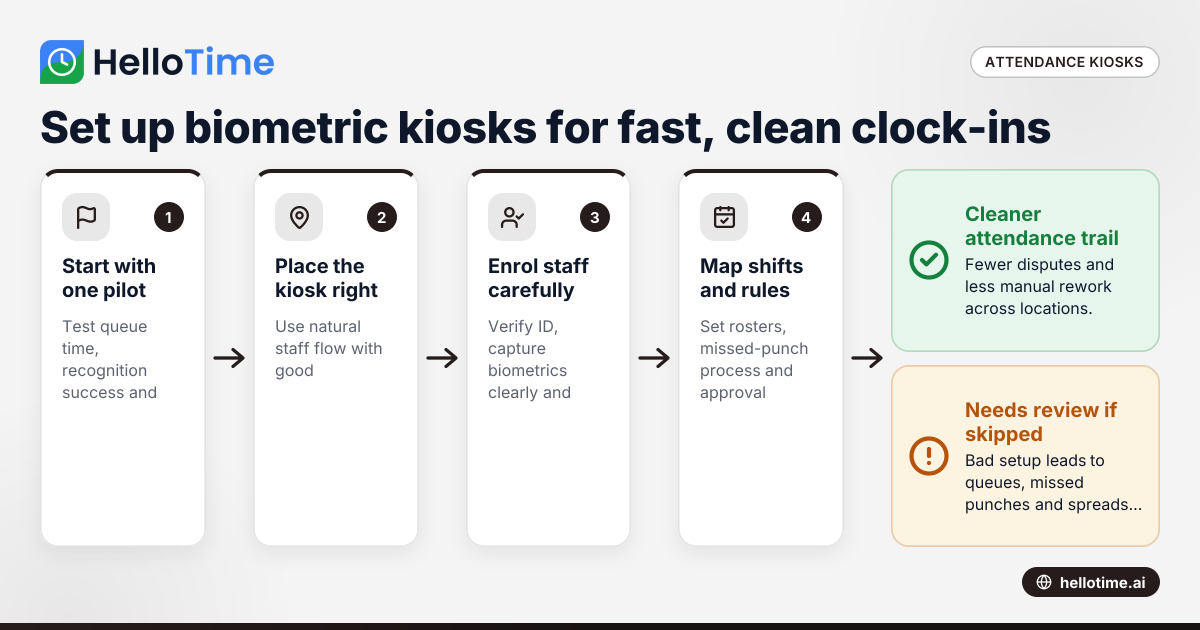
Start with one pilot site, standardise the process and then repeat the same model branch by branch. Multi-location rollout succeeds when every site follows the same enrolment, placement and approval rules.
Here is a practical rollout process.
1. Pick one pilot location
Choose a site with moderate employee volume. Avoid your most chaotic site first. A 25-50 person office, store or unit is often a better pilot than a 300-person factory gate.
Use the pilot to measure:
- Average clock-in time
- Queue build-up at shift start
- Recognition success rate
- Number of exceptions per week
- Manager effort needed for approvals
2. Fix the device location
Placement matters more than many businesses expect. Install the kiosk where employees naturally pass, but not where they block the entrance. For face recognition, avoid strong backlight. For fingerprint devices, avoid dusty corners or exposed outdoor areas.
3. Enrol employees properly
Poor enrolment causes daily problems later. Create a standard enrolment process:
- Verify employee ID and branch
- Capture biometric data clearly
- Assign department and shift group
- Test one check-in and one check-out
- Explain missed-punch reporting
- Record completion in HR files
If you use a tablet kiosk with face recognition, enrolment should be supervised so staff do not upload poor-quality photos.
4. Map shifts and schedules
A kiosk records punches. It does not solve scheduling by itself. You must map employees to the correct roster, weekly offs and shifts.
This is especially important for:
- Rotational factory shifts
- Split shifts in hospitality
- Weekly roster changes in retail
- Seasonal staffing in warehouses
5. Define approval rules
Not every punch should go straight into payroll without review. Set approval rules for:
- Late arrivals
- Early exits
- Overtime
- Missed punches
- Unscheduled workdays
6. Train staff and supervisors
Run a short training at each location. Show staff how to clock in, what to do if recognition fails and whom to contact. Train supervisors to review daily exceptions instead of waiting until month-end.
7. Review the first payroll cycle
After the first full cycle, compare kiosk attendance with:
- Shift rosters
- Leave records
- Overtime approvals
- Payroll inputs
This is where hidden issues show up. Fix them before rolling out to every location.
What does it cost?
The cost depends on device type, number of locations, attendance complexity and whether you also need scheduling, leave, approvals and payroll. For most small businesses, the bigger cost is manual rework from a poor setup, not the kiosk itself.
When you estimate budget, look beyond hardware.
Hardware and installation
Consider:
- Number of kiosks needed per location
- Wall mount or stand
- Power backup
- Protective casing for industrial environments
- Camera quality for face recognition
- Replacement and maintenance plans
A busy factory gate may need more than one clock-in point. A small office may need only one.
Software and admin effort
You also need:
- Employee enrolment time
- Shift configuration
- Policy setup
- Attendance review
- Payroll preparation time
- Ongoing branch support
If attendance sits in one system and payroll sits in another spreadsheet, your admin effort remains high. This is why many businesses look for a single tool that connects attendance, leave, shifts and payroll. If you are evaluating options, this guide to time tracking software in India can help frame your shortlist.
How can you reduce queues and missed punches?
Use more than one kiosk where traffic is heavy, place devices correctly and keep rules simple. Most missed punches come from bad placement, poor enrolment or unclear shift rules, not from staff resistance alone.
Here are practical fixes that work.
Separate entry flow from security checks
If one narrow gate handles bag checks, visitor entry and employee attendance, queues will form. Attendance kiosks should sit in the natural employee flow, not inside a bottleneck.
Match kiosk count to peak load
Do not calculate average attendance volume. Calculate peak attendance volume in a 10-15 minute window. That is what decides queue length.
Use clear signage
A simple board helps:
- Face the screen
- Remove cap if needed
- Wait for confirmation
- Contact supervisor if not recognised
Small instructions reduce hesitation and repeat attempts.
Keep fallback rules ready
Every location needs a fallback for internet issues, power cuts or temporary device problems. That may include supervised manual exception entry followed by manager approval.
Audit exceptions weekly
Do not wait until salary processing. Review failed recognitions, missing punches and duplicate entries every week. This keeps the data clean and builds trust.
Common mistakes small businesses make
Treating the kiosk as a complete attendance system
The device only captures punches. You still need roster logic, leave workflows, approvals and reports.
Ignoring branch differences
A Mumbai office reception and a workshop in Pimpri-Chinchwad do not have the same flow, lighting or shift pressure. Setup should be standard, but not blind to site conditions.
Skipping employee communication
If staff do not know why the kiosk is being introduced, they may assume it is only for stricter monitoring. Explain the practical benefit: fair attendance, faster issue resolution and fewer payroll disputes.
Not planning for privacy
Biometric attendance should never be treated casually. Restrict access to authorised HR or operations staff. Keep a written policy. Avoid sharing attendance screenshots loosely on WhatsApp groups.
Leaving payroll reconciliation to month-end
This is where manual work returns. Daily or weekly reviews are better than one large cleanup before salaries.
Connecting attendance to shifts, leave and payroll
The biggest value of a biometric kiosk appears after the punch is recorded. If the data is isolated, you still spend time exporting, correcting and re-entering it elsewhere.
A stronger process looks like this:
- Employee clocks in at the kiosk
- Attendance maps to assigned shift
- Exceptions go to manager review
- Approved attendance updates timesheets or work hours
- Leave records adjust payable days
- Payroll uses approved attendance inputs
For Indian businesses, this matters because payroll work is already detailed. Once attendance and leave are organised, salary processing becomes more reliable. If you need one platform for attendance, shift scheduling, leave, approvals and payroll with Indian statutory deductions, review HelloTime’s features to see how the full workflow fits together.
Is a kiosk enough for field or hybrid teams?
No. A kiosk is best for fixed-location attendance. If employees move between customer sites, warehouses and branches, you may need kiosk attendance for some teams and mobile or geofenced clock-ins for others.
Many businesses have mixed attendance needs:
- Head office staff use a kiosk
- Store staff use branch kiosks
- Field technicians use GPS clock-in
- Supervisors approve exceptions centrally
This hybrid setup is common in service businesses, sales operations, distribution teams and maintenance companies. The right attendance design depends on where work starts and how movement is controlled.
Choosing software for a biometric attendance kiosk India rollout
When comparing tools, focus on daily usability. Fancy hardware matters less than whether your team can run attendance cleanly every day.
Look for:
- Fast employee enrolment
- Simple branch and shift mapping
- Attendance exception review
- Leave integration
- Overtime approval flows
- Payroll readiness for India
- Multi-location reporting
- Tablet kiosk attendance with face recognition
- GPS and geofenced options for non-kiosk teams
Keep reading
Related articles
How Delaware Small Businesses Can Choose the Best Attendance App to Improve Workforce Management
How Delaware Small Businesses Can Choose the Best Attendance App to Improve Workforce Management Tracking employee attendance is essential for.
How United States Businesses Can Use GPS Geofence Attendance to Improve Field Staff Management
GPS geofence attendance uses location-based technology to track when field employees enter or leave a designated work zone. This method automates.
How Biometric Attendance Kiosks with Face Recognition Improve Workforce Management for United States Small Businesses
Biometric attendance kiosks with face recognition use AI technology to capture employee attendance quickly and accurately without physical contact.