Employee Attendance Kiosk Setup in United States: How Small Businesses Can Run Fast, Accurate Clock-Ins at One Entrance or Across Multiple Sites
An employee attendance kiosk is a shared clock-in station that lets staff start and end shifts quickly at a fixed location. For small businesses in.
The HelloTime team
12 min read
On this page
An employee attendance kiosk is a shared clock-in station that lets staff start and end shifts quickly at a fixed location. For small businesses in the United States, it can reduce buddy punching, speed up shift changes, and give managers cleaner attendance records than paper sheets or spreadsheet updates.
A good kiosk setup is simple. Put the device at the right entrance, set clear clock-in rules, train staff in one short session, and review early exceptions every day for the first few weeks.
Key takeaways
- An employee attendance kiosk works best when it sits at the real point of entry, not in a back office.
- The fastest setups use a tablet, clear shift rules, and a simple approval process for missed punches.
- Face recognition, PINs, and geofenced locations can help reduce time theft and buddy punching.
- Multi-site businesses should standardize policies first, then configure each location around local traffic flow.
- Attendance data is more useful when it feeds timesheets, leave records, schedules, and payroll exports.
- Small businesses should document rules, privacy notices, and correction workflows before launch.
What is an employee attendance kiosk?
An employee attendance kiosk is a shared device, usually a tablet, mounted at a workplace entrance so employees can clock in and out from one place. Instead of asking each worker to use a personal phone or sign a paper sheet, the business creates one controlled attendance point that managers can monitor.
For many small businesses, this solves a basic operations problem. Staff arrive in waves. A retail store in Chicago may have five associates arriving within ten minutes. A restaurant in Houston may have back-of-house and front-of-house teams starting at different times. A construction office may have crews stopping by before heading to a jobsite. In each case, the business needs a fast and repeatable way to capture attendance.
A kiosk is especially useful when:
- Employees do not all have company-issued devices
- Personal phone use is limited on the floor
- The business wants clock-ins at one physical entrance
- Managers need a visible attendance process
- Shift changes happen quickly
- The team has struggled with manual errors or disputed hours
The goal is not just to record a timestamp. It is to build a reliable daily record of who arrived, when they arrived, and whether that matched the schedule.
Why do small businesses choose an attendance kiosk?
Small businesses usually move to a kiosk after paper and spreadsheets start failing under real-world pressure. A handwritten log can be illegible. A spreadsheet update may happen hours later. A supervisor texting attendance to payroll creates delays and mistakes.
A kiosk creates one source of truth. It can also reduce common problems such as:
- Lines at the start of a shift
- Missed punches
- Employees clocking in from the wrong area
- Disputes over arrival time
- Manual timesheet cleanup
- Weak visibility across multiple sites
For shift-based teams, speed matters. If ten employees arrive at 7:55 AM and your process takes even 30 extra seconds per person, the line grows fast. That affects the start of service, production, or opening tasks.
For office and professional-services teams, the value is often consistency. If some people clock in by email, others by a sheet, and others through a manager, the records are hard to trust. A kiosk standardizes the start and end of the workday.
What should an employee attendance kiosk include?
A useful employee attendance kiosk includes a shared device, a secure clock-in method, and a clear ruleset for exceptions. It should be easy for employees to use in seconds and easy for managers to review later.
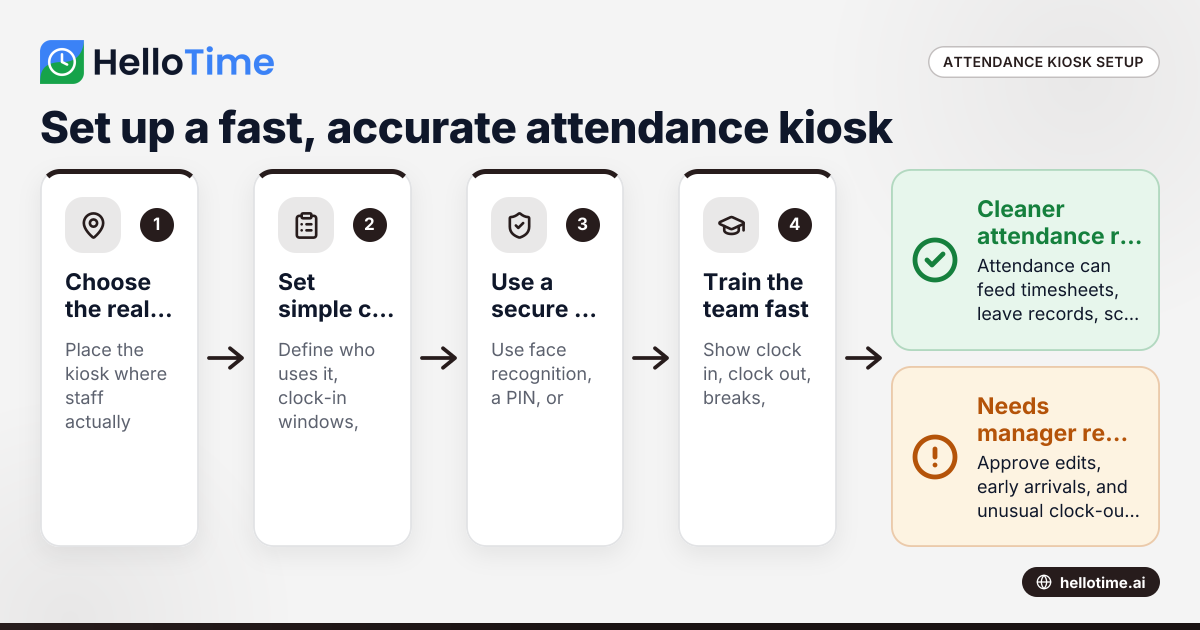
At a minimum, most small businesses need:
A device at the entrance A wall-mounted tablet is common because it is simple and familiar.
A secure identification method This may be face recognition, a PIN, or another approved method.
A location-based rule The device should only be used at the intended site or entrance.
A visible shift policy Employees should know how early they can clock in and what to do if they miss a punch.
A manager review workflow Someone should approve edits, early arrivals, and unusual clock-outs.
A reporting layer Attendance should flow into timesheets, shift records, and payroll preparation.
This is where software matters. A kiosk on its own is just a screen. The real value comes when attendance records tie back to schedules, leave, approvals, and billable or payable hours. If you want to see what that looks like in practice, you can review HelloTime’s features.
How do you set up an employee attendance kiosk at one entrance?
Start with one entrance, one device, and one simple rule set. Put the kiosk where employees actually enter, limit who can edit punches, and test the full flow for a week before treating the data as final.
1. Choose the real entry point
Do not place the kiosk where it is convenient for management if employees enter somewhere else. The best location is the one most staff already use. That may be the front door, employee entrance, warehouse side door, or breakroom corridor near the floor.
Walk the route employees take at the busiest time of day. Look for:
- Foot traffic bottlenecks
- Wi-Fi stability
- Power access
- Lighting if using face recognition
- Privacy from customers or visitors
- Enough wall space for safe mounting
2. Decide who will use the kiosk
Some businesses put every hourly employee on the kiosk. Others use it only for shift workers while office staff use another method. Keep the first rollout narrow if needed.
Define the user group in plain language:
- Who must clock in at the kiosk
- Whether managers use it too
- Whether contractors or temporary workers are included
- Which shifts begin at that entrance
3. Set clock-in windows
A common source of confusion is early clock-ins. If employees can clock in too early, labor costs rise. If they cannot clock in until the exact minute, you create a line.
Create a practical window. For example, your team may allow clock-in a few minutes before the shift starts and require manager approval outside that range. Keep the rule consistent and post it near the device.
4. Configure the identity check
The best method is the one employees can complete in seconds. Face recognition can reduce buddy punching in shared environments. PINs are simple but can be shared. Some businesses combine methods for added control.
If you plan to use ai employee attendance tools such as face-based verification, test them under real lighting and traffic conditions. A process that works in a quiet office may behave differently at a busy side entrance at 6:55 AM.
5. Train in under 15 minutes
Do not turn kiosk training into a long meeting. Show the team exactly how to:
- Clock in
- Clock out
- Start or end a break if your policy requires it
- Report a missed punch
- Ask for a correction
Then ask two employees to demonstrate the process in front of the group.
6. Review exceptions daily for two weeks
The first two weeks reveal most setup errors. Review:
- Missed punches
- Early or late clock-ins
- Duplicate punches
- Device downtime
- Employees using the wrong entrance
- Attendance mismatches against the roster
Quick manager review keeps the system credible.
How can you run an employee attendance kiosk across multiple sites?
Standardize policy first, then adapt the physical setup by location. One rulebook should govern attendance, but each site may need different device placement, network checks, and manager responsibilities.
Multi-site attendance fails when every location improvises. A business with stores in Detroit and Houston may have different building layouts, but it should not have different definitions of “late,” “missed punch,” or “approved edit” unless there is a documented reason.
Create one attendance policy
Before installing devices, document:
- Required clock-in method
- Allowed clock-in window
- Break and meal recording rules if tracked
- Missed punch correction process
- Manager approval authority
- Rules for off-site work or field visits
- Device backup plan if the kiosk is offline
This article is general information, not legal or tax advice. If your business is dealing with wage and hour compliance questions, confirm your policy with qualified counsel or your HR advisor.
Assign one owner per site
Every location needs one person responsible for daily attendance checks. That may be a store manager, site supervisor, or operations lead. Without a local owner, errors pile up until payroll week.
That person should review:
- No-shows
- Unexpected overtime indicators
- Attendance edits
- Device issues
- Employees regularly bypassing the kiosk
Match the setup to the site layout
One entrance works for some businesses. Others need more than one kiosk. A manufacturing site may need one station near the main employee door and another near a warehouse entrance used by second shift. A hospitality business may need one device for front-of-house and another for kitchen staff if they enter from different points.
Do not add extra kiosks too quickly. Every extra station adds complexity. Start with the minimum number that keeps lines short and policies clear.
Use location controls where needed
If employees should only clock at a specific site, use location rules to support that policy. This is especially useful for businesses with several nearby branches or field teams returning to a depot.
For teams evaluating HelloTime in the US, the practical benefit is combining fixed-site attendance with schedules, timesheets, approvals, and location-aware controls in one place.
What does it cost?
A small business can usually start with a tablet, a secure mount, power, and attendance software. The bigger cost is often setup time, training, and manager follow-through, not the hardware itself.
When owners think about cost, they often focus only on the device. That is part of the budget, but not the full picture. Your real cost includes:
- Hardware and mounting
- Protective casing if the area is high traffic
- Network reliability
- Initial setup time
- Staff training
- Supervisor review time
- Ongoing support for exceptions
The better way to think about cost is by comparing it to the current process. If a manager spends three hours every payroll period fixing handwritten logs, that is a labor cost. If buddy punching adds even small extra time every week, that also adds up. If attendance disputes delay payroll prep, the hidden cost grows again.
For many small businesses, a kiosk pays off when it reduces payroll cleanup, disputed hours, and time theft. If you are comparing software options, it is better to review current plans directly at pricing than to rely on old numbers in a blog post.
How do you prevent lines, missed punches, and buddy punching?
Use the fastest sign-in method that still verifies identity, place the kiosk at the true entry point, and keep exception handling simple. Most problems come from poor placement, unclear rules, or slow correction workflows.
Prevent lines at shift start
Lines usually happen for one of three reasons:
- The kiosk is too far from the real entrance
- The sign-in flow takes too many steps
- Too many employees arrive in the same two-minute window
To fix this, observe one full shift change in person. Time how long each punch takes. If the process is slow, remove extra prompts. If the queue is still long, adjust arrival expectations or add another station only if needed.
Reduce missed punches
Missed punches are often a process problem, not an employee problem. People forget when:
- Break rules are inconsistent
- The device is not visible at exit
- Managers fix records later without feedback
- Staff are rushed at shift end
Post simple instructions near the kiosk. Train managers to close the loop when an employee misses a punch. Repeated missed punches should trigger coaching, not silent corrections.
Limit buddy punching
Buddy punching is harder when clock-in requires the employee to be physically present and individually identified. Shared PINs weaken control. Face recognition and on-site device rules strengthen it.
If you use ai employee attendance features for identity checks, explain the process clearly to employees before launch. They should know what the system does, what the backup method is, and who can help when the device does not recognize them.
Best practices for kiosk rollout in retail, hospitality, field service, and light manufacturing
Different industries use the same kiosk idea, but the operating details change.
Retail
Retail teams often have concentrated opening and closing times. Put the kiosk where associates enter before they begin floor tasks. Avoid placing it where customer traffic blocks access.
Managers should compare attendance against the day’s roster before the store gets busy. That helps catch no-shows early.
Hospitality
Restaurants and hotels deal with staggered starts and fast pace. Staff need a clock-in process that works during prep, service, and late-night close. Place the device where team members can access it without crossing active guest areas.
Clear rules matter here because role changes are common. If someone moves from prep to service or extends a shift, managers need a clean approval path.
Field service
A field team may not start every day at the same customer site. Many small businesses use a kiosk at the branch or depot for crews that report in before leaving. Others combine a kiosk for in-yard staff with mobile location controls for technicians in the field.
The key is consistency. Do not make employees guess when they should use the kiosk and when they should use another method.
Light manufacturing
Manufacturing sites often have large shift waves. That means kiosk speed matters more than almost anything else. Place the station close to the entrance workers use before reaching lockers, tools, or production areas.
Test second-shift lighting if using face recognition. Night conditions can be very different from your daytime trial.
Reporting, approvals, and payroll prep after the kiosk goes live
A kiosk is only the front end of attendance. The back end is where managers turn punch data into approved payable time.
Build a daily review rhythm
Managers should review attendance every day, not just before payroll. A five-minute daily check is easier than a two-hour cleanup later.
Look for:
- Missing in or out punches
- Long gaps between scheduled and actual start times
- Unapproved early arrivals
- Unexpected overtime patterns
- Employees clocking at unusual times
Tie attendance to schedules and leave
Attendance is more accurate when it has context. A late clock-in means one thing if the employee was scheduled at 8:00 AM. It means another if they were approved for a later start or were out on leave.
That is why businesses often outgrow stand-alone clock tools. They need attendance, schedules, leave, approvals, and timesheets connected.
Keep reading
Related articles
How Delaware Small Businesses Can Choose the Best Attendance App to Improve Workforce Management
How Delaware Small Businesses Can Choose the Best Attendance App to Improve Workforce Management Tracking employee attendance is essential for.
How United States Businesses Can Use GPS Geofence Attendance to Improve Field Staff Management
GPS geofence attendance uses location-based technology to track when field employees enter or leave a designated work zone. This method automates.
How Biometric Attendance Kiosks with Face Recognition Improve Workforce Management for United States Small Businesses
Biometric attendance kiosks with face recognition use AI technology to capture employee attendance quickly and accurately without physical contact.