Geofence Attendance for Field Staff in United States: How to Track Mobile Clock-Ins Across Jobsites and Service Calls
Geofence attendance for field staff lets you confirm that employees clock in and out from the right place, at the right time, on a mobile device. In.
The HelloTime team
12 min read
On this page
Geofence attendance for field staff lets you confirm that employees clock in and out from the right place, at the right time, on a mobile device. In the United States, it is a practical way to reduce buddy punching, clean up timesheets, and track hours across jobsites, service calls, and customer locations without relying on paper or text messages.
Key takeaways
- Geofence attendance creates a virtual boundary around a jobsite, store, customer address, or service area.
- Field staff can clock in on their phones only when they are inside the allowed location.
- GPS, geofences, and photo or face-based checks can reduce disputes and manual edits.
- Clear written policies matter because location tracking raises privacy and wage-and-hour questions in the United States.
- The best setup links attendance, scheduling, leave, approvals, billable time, and payroll exports in one workflow.
What is geofence attendance for field staff?
Geofence attendance for field staff is a location-based attendance method. A business sets a virtual boundary around a work location. Employees can clock in or out only when their phone is inside that area.
For field teams, this solves a common problem. Work does not happen at one fixed office. It happens at homes, retail sites, warehouses, construction projects, and customer facilities across a city or region.
Think about a field service company in Houston. One technician starts the day at a warehouse, then drives to three service calls. Another goes straight from home to a customer site. A paper timesheet will miss detail. A normal office punch clock will not help. Geofence attendance gives each stop a location-aware clock-in option.
This is useful for businesses such as:
- HVAC and electrical service companies
- Plumbing and maintenance teams
- Construction subcontractors
- Property management crews
- Cleaning and janitorial services
- Home healthcare support teams
- Retail merchandisers and auditors
- Installation and delivery teams
The goal is not just surveillance. The goal is cleaner records. When your attendance system knows where the employee is, managers spend less time asking basic questions like, “Did Mike actually arrive at the Chicago jobsite by 7:00 a.m.?” or “Which crew reached the Detroit site first?”
How does geofence attendance work for mobile teams?
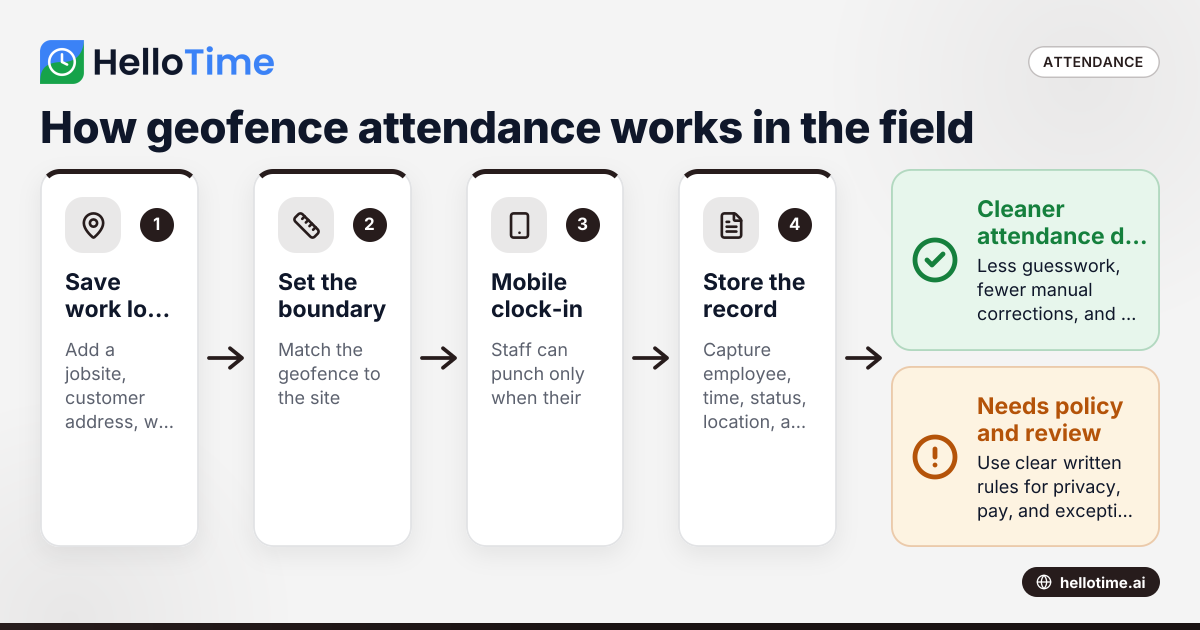
It creates a virtual work zone around each approved location. Staff open a mobile app and clock in only when the phone is inside that zone. Managers then see the time, location, and employee details in one attendance record.
Under the hood, geofence attendance combines a few simple tools:
1. A saved work location
This could be a street address, customer site, warehouse, project entrance, or store. The system places a geofence around that location.
2. A radius or boundary
The geofence needs a size. A small office might use a tight radius. A large construction site may need a wider boundary. The right size depends on the physical layout, parking access, and GPS accuracy in the area.
3. A mobile clock-in action
The employee opens the app and taps clock in. The app checks the phone’s location against the saved geofence. If the worker is in the approved area, the punch is accepted.
4. A stored attendance record
The record usually includes:
- Employee name
- Date and time
- Clock-in or clock-out status
- Jobsite or customer location
- Device location at the time of the punch
- Any notes, shift link, or approval status
5. Manager review and approvals
Supervisors review exceptions. These could include missed punches, late arrivals, early departures, or attempts outside the geofence.
For mobile teams, this works best when attendance is tied to the day’s schedule. If a technician is assigned to a 9:00 a.m. service call in Dallas and a 1:00 p.m. call in Fort Worth, the system should make it easy to see whether both location-based punches match the assigned jobs.
Why do field businesses in the United States use geofence attendance?
They use it to reduce time theft, speed up payroll preparation, and create a better record of where work started and ended. It is especially helpful when teams move between many locations in one week.
Here are the main reasons businesses adopt it.
It cuts buddy punching and guesswork
Buddy punching is common when attendance is handled by calls, texts, or handwritten logs. Geofences add location proof. The employee must be at the jobsite to clock in.
It improves payroll inputs
Even if your payroll system is separate, better attendance data matters. Clean clock-in records mean fewer manual corrections before overtime calculations or payroll exports. This article is general information, not legal or tax advice.
It supports billable field work
For service businesses, attendance can also support customer billing. If a technician clocks in at a client address at 10:03 a.m. and clocks out at 11:41 a.m., the office has a better record for invoicing and job costing.
It helps with disputes
Customers sometimes challenge service duration. Employees sometimes challenge edits. Managers sometimes lack context. A location-linked attendance record gives everyone a stronger starting point.
It helps supervisors manage distributed teams
A field manager in Phoenix cannot physically check ten crews at ten addresses. Mobile attendance reduces the need for constant phone calls.
What should you track at a jobsite versus a service call?
Use larger geofences for fixed jobsites and tighter geofences for short service stops. The main goal is to match the boundary to the real work pattern, parking limits, and GPS reliability at each location.
There is no single setup that fits every field team. A construction company and a repair business work differently.
Jobsites
A jobsite is usually active for days, weeks, or months. Examples include:
- New construction projects
- Renovation sites
- Utility work zones
- Long-term installations
- Manufacturing maintenance shutdowns
For these, you may need:
- Wider geofence boundaries
- Separate geofences for multiple gates or buildings
- Crew-based assignments
- Tablet kiosk options for shared entry points
- Daily shift schedules tied to the site
Service calls
A service call is usually shorter and more address-specific. Examples include:
- HVAC repair
- Appliance installation
- Home maintenance
- Telecom service visits
- Retail equipment repairs
For these, you may need:
- Smaller geofence radiuses
- Job-by-job scheduling
- Notes tied to each visit
- Multiple punches in one day
- A simple process for location exceptions
The best setup reflects the physical reality of the work. If downtown Chicago parking forces workers to park two blocks away, your geofence should account for that. If a refinery in Houston has restricted access points, you may need a larger arrival zone and a separate internal process for crew start times.
How do you set up geofence attendance for field staff?
Start with your most common field locations, define your rules, test with a small team, and review exceptions for two to four weeks. A rushed rollout usually creates false punches, frustrated employees, and extra payroll edits.
Here is a practical setup process.
1. Map your work types
List the places where work happens:
- Permanent branch or warehouse
- Repeating customer locations
- Temporary jobsites
- One-off service addresses
- Shared contractor sites
Group them by pattern. Do not treat every location the same.
2. Choose who can clock in where
Decide whether staff can:
- Clock in only at assigned locations
- Clock in at any approved company location
- Transfer between locations during the day
- Start travel time from a branch or first job
This step matters because attendance and wage rules can be sensitive. Your written policy should define when work time starts and what happens when an employee arrives early, waits on site, or travels between calls.
3. Set reasonable geofence sizes
Do not make the geofence too tight. GPS can drift, especially around tall buildings, warehouses, or indoor areas. Test real conditions before you lock the rule.
4. Define exception handling
Create a clear process for:
- Missed punches
- No-signal areas
- Dead phone batteries
- Customer sites with bad GPS reception
- Supervisor-approved manual edits
If the only answer is “call payroll,” the process will break fast.
5. Pilot the system
Use one branch, one crew, or one region first. Watch where punches fail and why. Most setup issues come from bad location data, unrealistic radiuses, or unclear employee instructions.
6. Train staff in plain English
Show workers:
- Where to tap clock in
- What to do if the app says they are outside the geofence
- How to add notes
- When to clock out
- Who approves corrections
7. Review and tighten
After the pilot, clean up your rules. Then expand.
Where does ai geofence attendance help?
AI geofence attendance helps by flagging unusual punches faster, such as repeated out-of-area attempts, overlapping job clocks, or patterns that do not match schedules. It can help managers review exceptions instead of checking every single attendance record by hand.
The practical value of AI in this area is not magic. It is pattern detection. Field attendance generates many small exceptions. A smart system can surface the few that need attention.
Examples include:
- An employee repeatedly clocks in just outside the jobsite
- Two service calls overlap in a way that looks impossible
- A crew clocks out far from the assigned location
- A worker misses punches only at one specific customer address
- A manager edits the same employee’s records every Friday
This saves time for supervisors and payroll staff. It also helps businesses build more consistent attendance reviews.
Still, AI should assist review, not replace judgment. GPS can be imperfect. Traffic changes plans. Customer access rules cause delays. A good manager needs context before making a correction or discipline decision.
What are the biggest mistakes with geofence attendance?
The biggest mistakes are using geofences that are too small, skipping policy training, and assuming GPS data is always perfect. Most attendance problems come from poor setup and unclear rules, not from the technology itself.
Below are the mistakes that create the most friction.
Using one radius for every location
A suburban warehouse, a hospital campus, and a downtown high-rise all need different boundaries. Standardizing everything sounds simple, but it creates false exceptions.
Ignoring the first and last 100 feet
Where do employees actually enter? Where do they park? Where is the loading dock? Those details matter more than the mailing address.
Not defining off-the-clock expectations
If employees receive after-hours alerts, route changes, or early arrival requests by phone, your attendance policy needs to match real operations. Managers should not create unpaid work by accident.
Failing to plan for signal issues
Some buildings have weak GPS or poor mobile coverage. Construction trailers, basements, and industrial facilities often cause problems. Build in a backup process.
Letting managers edit too freely
Manual edits should be visible and controlled. Otherwise, trust drops and payroll disputes increase.
Rolling out without employee communication
Field staff need to know what is tracked, when it is tracked, and why. Surprise tracking creates resistance.
Privacy, consent, and wage-and-hour points to think about in the United States
Location-based attendance can be useful, but it needs careful handling. In the United States, employers should use clear written policies, limit tracking to business needs, and make sure time records support accurate pay practices.
A few practical guidelines help:
Track only what you need
Attendance systems should support clock-in and clock-out workflows. They do not need broad, constant location monitoring outside working time.
Explain the policy in writing
Your policy should answer:
- When location is checked
- Whether tracking happens only during punches or during shifts
- Which devices are used
- How corrections are requested
- Who can view records
- How long records are kept
Review state and local requirements
Employment and privacy rules can vary by state and city. If you operate in California, Illinois, Texas, or New York, get local advice when needed. This is especially important if you use biometric tools like face recognition at a kiosk.
Match attendance records to pay practices
Supervisors should be trained not to ignore reported work time just because a geofence punch failed. If work was performed, the pay process must still address it properly.
How HelloTime supports field attendance workflows
HelloTime is useful when you need attendance, time tracking, shifts, approvals, leave, and job-based records in one system. For field teams, that can reduce the patchwork of spreadsheets, text messages, and manual timesheet edits that often slow down payroll and operations.
Practical features that matter for field staff include:
- GPS and geofenced clock-in
- Mobile time tracking
- Shift scheduling and rosters
- Tablet kiosk attendance with face recognition
- Leave management
- Timesheets and approvals
- Invoicing from billable hours
- Project profitability reporting
This matters most when your business handles both attendance and billable work. A service business may need to know not only whether a worker arrived, but also how those hours connect to the customer job, internal cost, and invoice.
If you want to see how these workflows fit together, you can explore the features available for attendance, time tracking, scheduling, and approvals. If your team operates in the United States, HelloTime in the US shows the market-specific product page.
How do you choose the right geofence attendance system?
Choose a system that fits your real field workflow, not just a demo. It should handle mobile punches, flexible job locations, exceptions, approvals, and clean exports without adding more manual work for supervisors.
Use this checklist before you commit.
Mobile usability
Field workers need a simple app. If clocking in takes too many steps, adoption will drop.
Flexible location setup
You should be able to create:
- Permanent sites
- Temporary jobsites
- Repeating customer addresses
- One-day service stops
Exception management
Look for clear review queues, edit logs, and approval workflows.
Attendance plus scheduling
A geofence tool is stronger when it connects to shifts and assignments. Otherwise, managers still need separate spreadsheets to know who was supposed to be where.
Reporting
You should be able to answer simple questions quickly:
- Who was late today?
- Which crew missed punches this week?
- Which site has the most attendance exceptions?
- How many billable hours were logged at each customer location?
Security and buyer expectations
Many business customers now ask software vendors about security practices. Even small and mid-sized buyers may expect answers about access controls, data handling, and vendor review processes.
Finance stack fit
If attendance data feeds invoices or accounting workflows, consider how it fits with tools your business already uses, such as QuickBooks or Stripe.
A simple rollout plan for a 25-person field team
A small rollout works best when it is operational, not theoretical. Start with one team and one manager.
Week 1: Policy and location cleanup
- List all active jobsites and repeating service addresses.
- Remove old or duplicate locations.
- Draft the attendance and correction policy.
- Train supervisors first.
Keep reading
Related articles
How Delaware Small Businesses Can Choose the Best Attendance App to Improve Workforce Management
How Delaware Small Businesses Can Choose the Best Attendance App to Improve Workforce Management Tracking employee attendance is essential for.
How United States Businesses Can Use GPS Geofence Attendance to Improve Field Staff Management
GPS geofence attendance uses location-based technology to track when field employees enter or leave a designated work zone. This method automates.
How Biometric Attendance Kiosks with Face Recognition Improve Workforce Management for United States Small Businesses
Biometric attendance kiosks with face recognition use AI technology to capture employee attendance quickly and accurately without physical contact.