How to Build a Pricing Calculator for US-Based Service Agencies to Estimate Billable Hours
Building a pricing calculator is essential for US-based service agencies to estimate billable hours and project costs accurately. It converts project.
The HelloTime team
6 min read
On this page
Building a pricing calculator is essential for US-based service agencies to estimate billable hours and project costs accurately. It converts project scope and employee time into precise estimates, improving client communication and profitability. Adding an AI pricing calculator can boost accuracy and efficiency in quoting.
Key takeaways
- A pricing calculator estimates billable hours based on services, employee rates, and project complexity.
- Using an AI pricing calculator enhances the accuracy and speed of pricing estimates.
- Essential components include defining pricing models, tracking time, and including labor and overhead costs.
- Ensure alignment with US labor laws and invoicing standards for accurate quotes.
- Testing and refining your calculator ensures reliable and consistent pricing.
- Integration with time tracking software like HelloTime streamlines workflow and billing accuracy.
What is a pricing calculator for service agencies?
A pricing calculator is a tool that converts services, employee hours, and rates into consistent project cost estimates. US service agencies use it to generate transparent pricing quotes based on billable hours. This reduces errors, improves bids, and helps projects stay profitable.
The tool considers service types, roles, timelines, complexity, overhead, and client pricing arrangements. It avoids undercharging or overcharging by estimating costs accurately according to the agency's business model.
How does an AI pricing calculator improve estimates?
An AI pricing calculator automates and sharpens cost estimates by analyzing past projects, employee productivity, and client specifics.
AI pricing calculators reduce manual errors, save time, and adapt to regional wage differences or project complexities. This helps US agencies remain competitive and profitable by predicting accurate billable hours and pricing dynamically.
Their ability to simulate various project scenarios allows faster, data-backed pricing decisions.
How do you build an effective pricing calculator?
Building an effective pricing calculator follows several clear steps tailored to your agency’s workflow and client projects.
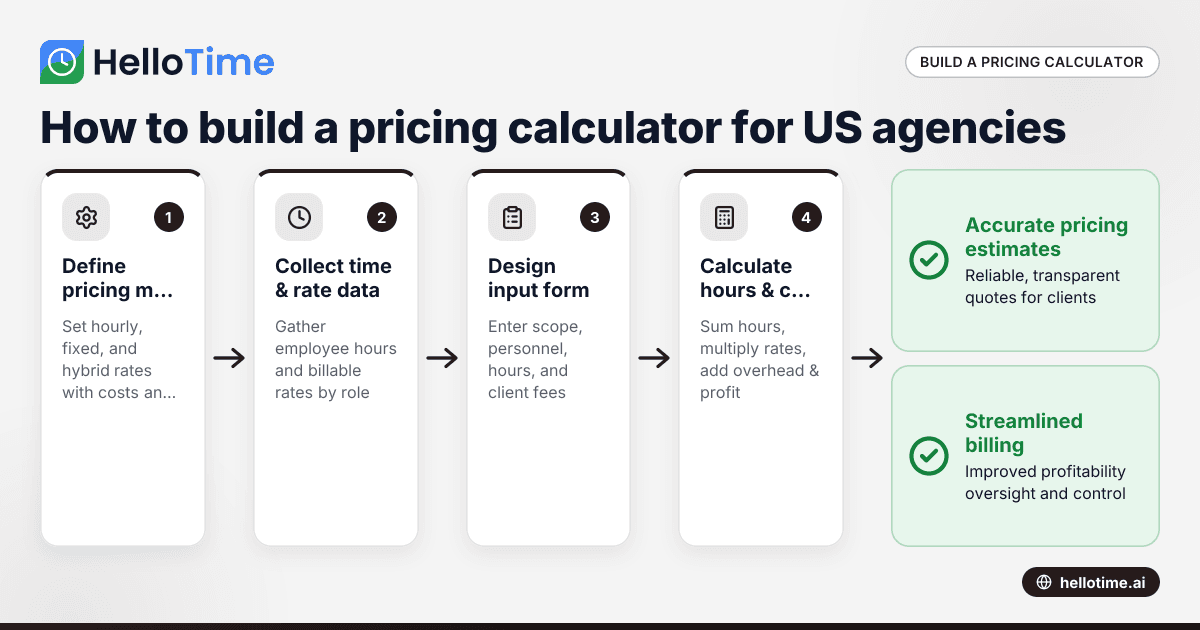
Step 1: Define your pricing models and parameters
Decide whether you charge hourly, fixed fees, or hybrids. List all costs and rates involved, including:
- Billable hours per employee role
- Hourly or flat project rates
- Additional costs like software and subcontractors
- Overhead and desired profit margins
Clear pricing models are the foundation for accurate calculations.
Step 2: Collect employee time and role data
Gather data on team members’ billable rates and average time spent on tasks. This ensures your calculator reflects real productivity and costs per project phase.
Step 3: Design an intuitive calculator interface
Create an input form where project managers enter:
- Project scope and tasks
- Assigned personnel and hours
- Client-specific discounts or extra fees
Outputs should include total estimated hours, costs before and after margins, and suggested client prices.
Step 4: Calculate billable hours and costs
Set formulas to:
- Sum hours by task and employee
- Multiply by hourly rates
- Add overhead and profit margins
- Produce final client proposal prices
Ensure it accounts for variable billing rates and scenarios.
Step 5: Integrate with time tracking and invoicing tools
Connecting your calculator to workforce management software like HelloTime saves duplicate data entry and matches estimates to actual tracked hours. This integration simplifies billing and improves profitability oversight.
What services and fees should I include in my calculator?
A comprehensive pricing calculator for US agencies accounts for:
- Direct labor costs including employee hourly wages and benefits
- Subcontractor or freelancer billable hours
- Software or platform fees related to service delivery
- Travel expenses for field or client visits
- Administrative and overhead costs allocated per project
- Applicable state and city taxes depending on service types
- Profit margin goals to sustain your business
Including all relevant costs prevents margin erosion from hidden expenses.
Can I create a pricing calculator without coding skills?
Yes. Spreadsheet tools like Microsoft Excel and Google Sheets let you build custom calculators with formulas and dropdown menus. No-code platforms or pre-built templates for US service agencies also help simplify the process.
For better automation, you can integrate your calculator with time tracking software like HelloTime once you’re comfortable with basic models.
Consulting finance or operations experts is advisable to meet labor laws and invoicing standards accurately.
How to test and refine your pricing calculator?
Validate the calculator before client use by:
- Comparing estimates with actual completed projects.
- Gathering user feedback to improve interface and inputs.
- Testing scenarios by changing hours, roles, or rates.
- Updating for changes in labor laws, wages, and overheads in states like Michigan or Texas.
Regular updates keep your calculator trustworthy and relevant.
Why track billable hours alongside pricing?
Tracking billable hours with solutions like HelloTime aligns pricing with real employee productivity. This helps agencies:
- Detect scope creep vs. budgeted work fast
- Invoice clients accurately and timely
- Adjust pricing models based on real costs
- Generate profitability reports by client or project
Linking pricing with tracked time enhances transparency and control.
How does pricing calculators affect client communication?
Pricing calculators create transparent, detailed quotes itemizing hours and rates. Clear pricing reduces disputes and speeds approvals.
They enable agencies to quickly provide customized options based on project changes or timeline shifts. Data-driven pricing builds trust and improves client retention in US competitive markets.
Conclusion
Creating a pricing calculator customized for your US service agency improves quote accuracy, client trust, and profitability analysis. Start with defining pricing models, gather billable rates and hours, and design an intuitive interface. Add an AI pricing calculator for smarter estimates and connect with time tracking tools like HelloTime to streamline billing.
Explore HelloTime’s features and compare pricing plans to find what fits your workforce management needs.
Frequently asked questions
What is a pricing calculator in time tracking?
A pricing calculator estimates project costs by multiplying billable hours with hourly rates plus overhead. It helps agencies create clear, accurate quotes based on tracked or planned work.
How can AI improve pricing calculators?
AI analyzes historical data and productivity to generate dynamic, accurate pricing estimates, reducing errors and enhancing budget forecasts.
Should I include overhead costs in pricing calculations?
Yes. Including overhead ensures all indirect business costs are covered, protecting project profitability beyond direct labor expenses.
Can a pricing calculator handle different state labor rates?
Yes, if you update rates or program geographic differences manually or with data feeds. This ensures estimates reflect local wage variations.
How often should I update my pricing calculator?
Update at least yearly or when wage rates, labor laws, or business costs change across your operating states.
Is it better to build a pricing calculator or buy one?
Building allows customization; buying saves time with ready features. Combining custom pricing calculators with tools like HelloTime balances flexibility and automation.
Read next
This article covers one part of a bigger topic. For the complete picture, read our guide to pricing calculator.
Keep reading
Related articles
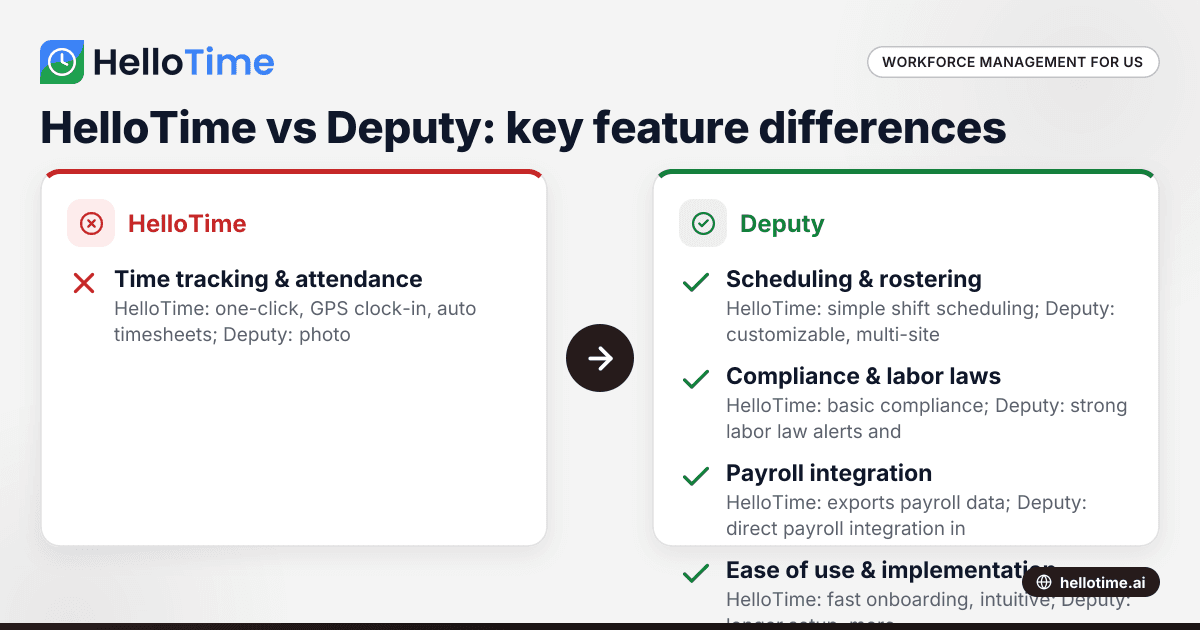
HelloTime vs Deputy: Which Workforce Management Software is Best for United States Small Businesses?
HelloTime and Deputy are popular workforce management tools offering employee scheduling, time tracking, and attendance solutions for US small.
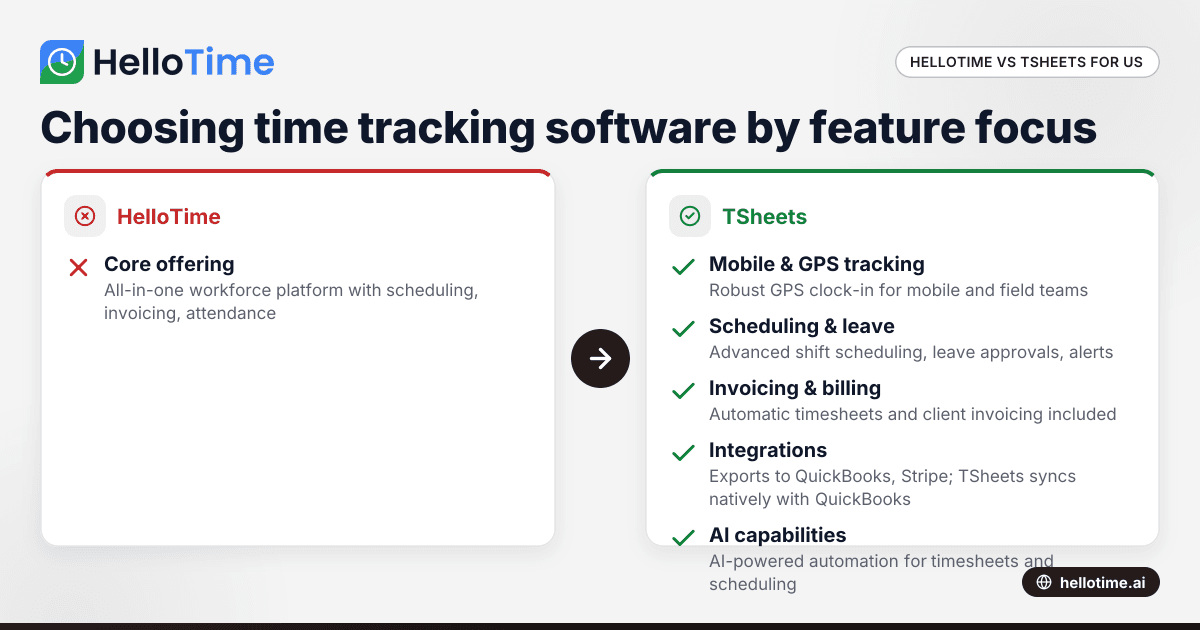
HelloTime vs TSheets: Choosing the Best Time Tracking Software for United States Agencies
HelloTime and TSheets are popular time tracking solutions for agencies and professional services in the United States. Comparing HelloTime vs TSheets.
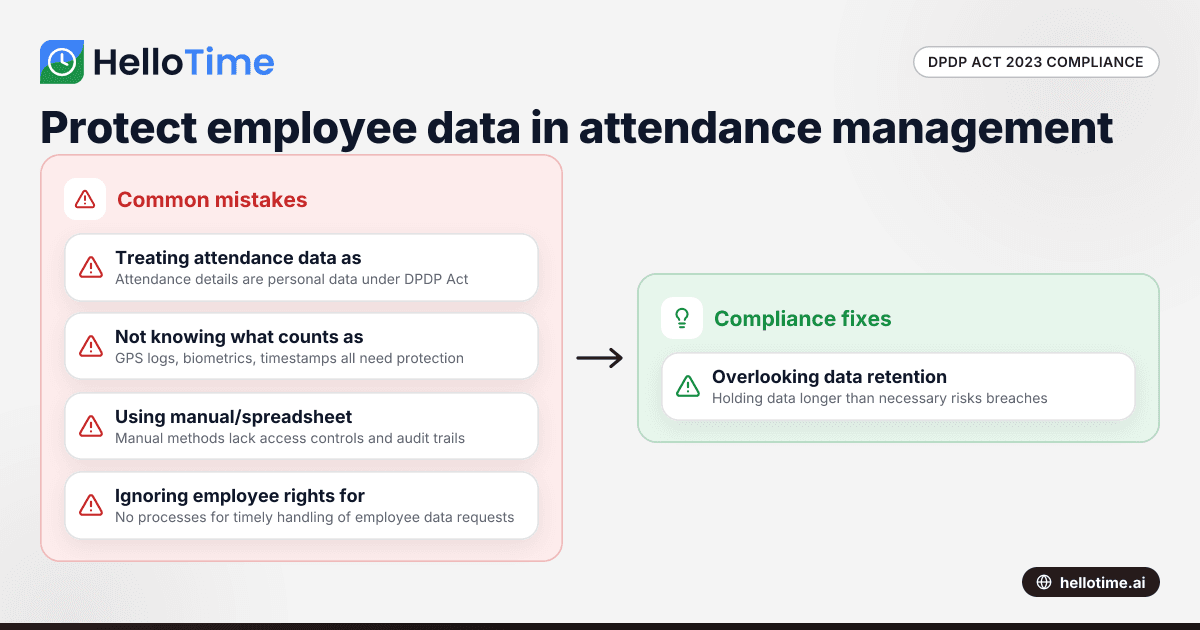
What Indian Businesses Need to Know About Data Protection Under the DPDP Act 2023 When Managing Attendance and Timesheets
Businesses tracking employee attendance and timesheets in India face growing risks if they overlook the DPDP Act 2023’s mandate for protecting.