Payroll Timesheet Approval for Small Businesses in United States: How to Review Hourly Pay Before You Run Payroll
Payroll timesheet approval in United States small businesses is the process of reviewing employee hours before payroll is finalized. It helps you.
The HelloTime team
12 min read
On this page
Payroll timesheet approval in United States small businesses is the process of reviewing employee hours before payroll is finalized. It helps you catch missing punches, overtime errors, duplicate entries, and wrong job codes so you pay people correctly and keep cleaner records for wage and hour compliance.
Key takeaways
- Payroll timesheet approval is the last review step before you run payroll for hourly teams.
- A simple approval workflow reduces payroll errors, disputes, and rework for managers and HR.
- The best review process checks hours, overtime, breaks, leave, and job or project allocation.
- Small businesses in United States should document who approves time and by what deadline.
- This article gives general information, not legal or tax advice, especially where wage and hour rules vary by state.
- Tools that connect time tracking, attendance, leave, and approvals can make payroll prep faster.
What is payroll timesheet approval in United States?
Payroll timesheet approval in United States means confirming that recorded work hours are accurate and ready to be used for pay. In a small business, this usually happens after the pay period ends and before payroll is submitted to your payroll provider or accounting system.
For hourly teams, this step matters because payroll errors often start with bad time data. An employee may forget to clock out. A supervisor may miss an approved shift swap. Someone may be assigned to the wrong client, cost code, or location. If you run payroll without checking those details, you can create underpayments, overpayments, and avoidable employee complaints.
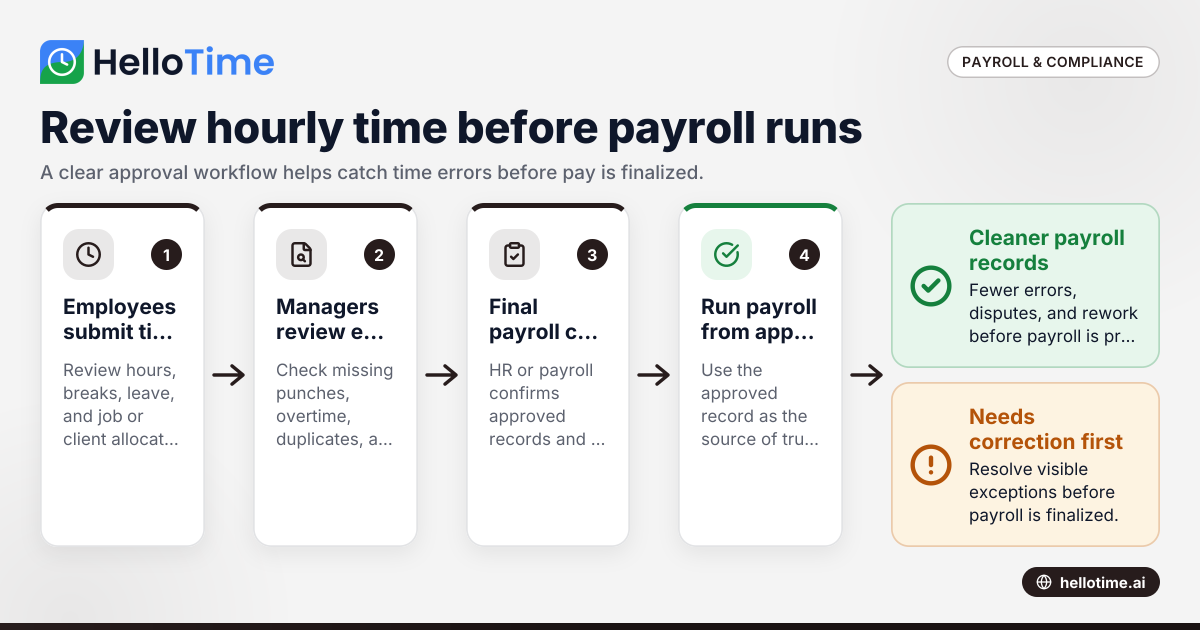
The approval process does not need to be complicated. For many small businesses, it is simply a clear workflow:
- Employees submit time.
- Managers review and correct exceptions.
- HR or payroll does a final check.
- Payroll is run from approved hours.
This is the core of a strong payroll timesheet approval United States process. It gives you one source of truth before money moves.
Why small businesses need a timesheet approval process
Many small businesses still collect time in spreadsheets, text messages, paper sheets, or scattered apps. That often works when the team is tiny. It breaks down as headcount grows, locations multiply, or schedules become more complex.
A formal approval process helps in four practical ways.
1. It reduces payroll mistakes
Hourly payroll has many moving parts. You may need to verify regular hours, overtime, paid leave, unpaid leave, holidays, training time, travel time, or different rates for different jobs. A review step catches the obvious problems before they become payroll corrections.
2. It creates manager accountability
When a named supervisor approves time, responsibility is clear. That matters in a restaurant group in Houston, a field service company in Chicago, or a small manufacturer in Detroit. Each department can own its labor data before payroll is processed.
3. It supports cleaner records
If an employee questions pay later, approved timesheets give you a documented record of what was reviewed and when. That is useful for internal audits and for resolving disputes quickly.
4. It protects margins
If your business bills by the hour, approved time affects more than payroll. It influences invoices, project costing, and profitability. A wrong hour entry can affect client billing and job margin, not just wages.
What should managers review before approving timesheets?
Managers should review the timesheet as if they are validating both attendance and pay inputs. The exact checklist depends on your business, but a few items show up in almost every payroll run.
Start with total hours
Check whether the total hours look reasonable for the schedule. Compare actual time against planned shifts, published rosters, or expected project work. Large gaps or unusually high totals are worth a second look.
Check missing and duplicate punches
A missing clock-out can create inflated hours. A duplicate entry can do the same. These are among the most common timesheet errors in shift-based teams.
Review overtime
Overtime review is one of the most important steps in payroll timesheet approval. Make sure extra hours were actually worked, properly authorized if your policy requires it, and categorized correctly in your records.
Because overtime rules can vary based on federal and state law, keep your process simple and consistent. Confirm what your payroll team needs, and document exceptions clearly.
Confirm breaks and meal periods
If your team clocks breaks, review whether they were recorded correctly. If your state has specific break requirements, make sure managers know what they must check. Avoid assumptions. Use a written process and train managers on it.
Validate leave and absences
Approved leave should match the timesheet. If someone took paid time off, unpaid leave, or a sick day under company policy, the timesheet should reflect that correctly before payroll is processed.
Verify department, client, or job coding
For service teams and job-based businesses, coding matters. A worker may have spent part of the week on billable client work and part on internal tasks. If those hours are assigned incorrectly, payroll may still be right, but reporting and invoicing may not be.
How does payroll timesheet approval work in a small business?
It works best as a short, fixed workflow with clear deadlines. Employees submit hours, managers review exceptions, and payroll only uses approved time. Keep one cutoff for each pay period, and make sure everyone knows who can edit time, who can approve it, and when approvals must be finished.
Under that simple structure, most small businesses can build a reliable routine without adding much admin work.
A practical 5-step workflow
1. Set a timesheet submission deadline
Pick a clear cutoff after the pay period ends. For example, if your pay period ends Sunday night, employees might need to submit time by Monday at 10:00 a.m. Managers can then review on Monday afternoon.
The key is consistency. A moving deadline creates confusion.
2. Ask employees to review their own time first
Before a manager sees the timesheet, employees should confirm:
- Start and end times
- Breaks
- Leave entries
- Job or client allocation
- Notes for unusual shifts or corrections
This step catches many errors early.
3. Have managers review exceptions, not just totals
Managers should look for anything outside the normal pattern:
- Missed punches
- Unscheduled shifts
- Extra hours
- Short shifts
- Wrong location or job code
- Leave that does not match the roster
Exception-based review is faster than reading every line manually.
4. Lock or mark approved time
Once approved, the timesheet should be clearly marked and protected from casual edits. If changes are needed later, they should follow a visible correction process.
5. Run payroll only from approved records
This sounds obvious, but many small businesses still process payroll from a spreadsheet that was edited after approval. That weakens the whole process. Use the approved version as the source of truth.
What should your payroll timesheet approval policy include?
A simple written policy helps managers and employees follow the same process every pay period. It does not need legal jargon. It needs clarity.
Include these items:
Approval deadlines
State when employees must submit time and when managers must approve it. Add what happens if someone misses the cutoff.
Roles and responsibilities
Define who can:
- Enter time
- Edit time
- approve time
- finalize payroll inputs
You may also want backup approvers for absences.
Correction rules
Explain how timesheet corrections are handled after approval. Include who can request changes, who can authorize them, and how they are documented.
Overtime and exception handling
State whether overtime needs prior approval under company policy. Also explain that all hours actually worked must still be recorded and reviewed.
Recordkeeping expectations
Managers should know they are reviewing a payroll input, not just a schedule report. They need to check carefully and approve on time.
Can AI help with payroll timesheet approval?
Yes. AI can help flag unusual hours, missing punches, duplicate entries, and schedule mismatches before payroll review. It does not replace manager judgment, but it can reduce manual checking and help teams focus on exceptions that are most likely to affect pay.
For small businesses, this is where software can save time without making the process feel complicated. An ai payroll timesheet workflow can surface issues like an employee clocking in outside a geofenced location, hours exceeding a planned shift, or leave that overlaps with worked time.
That does not mean you should approve payroll automatically. The final call should still sit with a manager or payroll owner. But AI-style exception detection can shorten review time and reduce the chance that obvious mistakes slip through.
This matters most when you have:
- Multiple locations
- High hourly headcount
- Frequent shift changes
- Job or client-based costing
- Tight payroll cutoffs
The goal is not to remove human review. The goal is to make human review faster and more accurate.
Common payroll timesheet approval mistakes
Even a decent process can fail if the team follows it inconsistently. These are some of the most common issues in small businesses.
Approving based on trust alone
Trust matters, but payroll should still be reviewed. Good employees also forget punches and select the wrong job code.
Letting managers approve late
A late approval pushes pressure onto payroll. Under time pressure, errors are more likely to be missed.
Fixing time outside the system
If a manager approves one record and payroll uses another, you lose control over the audit trail. Keep corrections visible and centralized.
Ignoring leave mismatches
A team member may appear on the schedule, submit time, and also have approved leave on the same date. That conflict should be resolved before payroll.
Not training approvers
Managers often know operations better than payroll rules. Give them a short checklist and clear examples. A one-page guide can help more than a long handbook.
How can you speed up payroll timesheet approval without losing control?
Use one system for time, shifts, leave, and approvals, then review exceptions first. Clear cutoffs, manager checklists, and automated alerts can reduce back-and-forth. The fastest process is not the one with the fewest checks. It is the one where the right checks happen in the right order.
That balance matters. If your process is too loose, payroll errors rise. If it is too manual, every pay period becomes a scramble.
Practical ways to make approval faster
Standardize pay period routines
Use the same timeline every period. Predictable routines reduce missed deadlines and last-minute fixes.
Build an exception checklist
Instead of telling managers to “review timesheets,” tell them exactly what to review:
- Missing punches
- Overtime
- Leave conflicts
- Wrong location or department
- Duplicate time entries
- Unusual totals
Use attendance controls at clock-in
GPS, geofencing, or kiosk attendance can reduce bad data at the source. When inputs improve, approval gets easier.
Keep schedules and time together
If managers can compare planned shifts to actual attendance in one place, they spot problems faster.
Separate review from payroll processing
Managers should approve labor data. Payroll should process from approved records. When one person does everything in a hurry, mistakes are easier to miss.
A sample weekly approval timeline
Here is a simple example for a small U.S. business running weekly payroll.
Sunday, 11:59 p.m.
Pay period ends.
Monday, 9:00 a.m.
Employees review and submit timesheets.
Monday, 1:00 p.m.
Managers review exceptions and approve time.
Monday, 4:00 p.m.
Payroll or HR checks approved records for final issues.
Tuesday morning
Payroll is submitted to your provider or finance workflow.
The exact timing may differ. The principle is the same. Give each person a clear deadline and avoid overlap.
Choosing software for payroll timesheet approval
If you are moving away from paper or spreadsheets, focus on tools that make review easier, not just data collection easier. Time capture is only half the job. Approval is where payroll confidence comes from.
Look for software that supports:
- One-click time tracking
- Shift scheduling and rosters
- Leave management
- Manager approvals
- GPS or geofenced clock-in for mobile teams
- Tablet kiosk attendance for on-site teams
- Billable hours and project reporting if you invoice by time
For a small business, the value is often in reducing admin time and cleanup work before payroll day. If you want to see how those pieces fit together, you can explore HelloTime’s features or learn more about HelloTime in the US.
When should a small business tighten its approval process?
You usually need a stronger process when one of these signs appears:
Payroll corrections are becoming normal
Occasional corrections happen. Repeated corrections point to weak time review.
Managers keep disputing labor numbers
If department leaders do not trust payroll hours, your review process is probably too loose or too late.
You bill clients from time data
Approved time affects both wages and revenue. That raises the stakes.
You have grown beyond one location
As soon as you operate across multiple sites, informal approval often breaks down. Central visibility becomes more important.
Compliance risk feels higher
If your team works variable hours, overtime, breaks, travel, or mixed job duties, stronger review is worth the effort.
A better approval process does not need to be heavy. It needs to be consistent, documented, and easy for managers to follow.
If you are reviewing options, compare what fits your process and team size at pricing.
Frequently asked questions
Who should approve timesheets before payroll?
Usually the direct manager approves timesheets first because they know the employee’s schedule and actual work. HR or payroll may then perform a final review for exceptions, missing data, or policy issues.
How often should timesheets be approved?
Most small businesses approve timesheets each pay period. Weekly and biweekly cycles are common, but the right cadence depends on your payroll schedule and how quickly managers can review exceptions.
Can approved timesheets be changed later?
Yes, but changes should follow a clear correction process. The business should document what changed, who authorized it, and whether the adjustment affects the current or a future payroll run.
What is the biggest risk of skipping timesheet approval?
The biggest risk is paying employees incorrectly. That can lead to employee complaints, time-consuming corrections, and weaker records if questions come up later about hours worked.
Is payroll timesheet approval the same as payroll processing?
No. Timesheet approval confirms the hours are correct. Payroll processing uses those approved hours to calculate wages, deductions, and final pay through your payroll workflow or provider.
Read next
This article covers one part of a bigger topic. For the complete picture, read our guide to uk payroll.
Keep reading
Related articles
How United States Businesses Can Use GPS Geofence Attendance to Improve Field Staff Management
GPS geofence attendance uses location-based technology to track when field employees enter or leave a designated work zone. This method automates.
How HelloTime’s AI-Powered Time Tracking Simplifies Shift Scheduling and Attendance in United States Retail
HelloTime’s AI-powered time tracking streamlines shift scheduling and attendance management for U.S. retail businesses by automating key tasks and.
How United States Small Businesses Can Implement One-Click Time Tracking to Simplify Payroll and Billing
Time tracking is the process of logging the hours employees spend on tasks or projects. For small businesses in the United States, adopting one-click.