Biometric Attendance Policy for Small Business in United States: How to Handle Face Recognition, Consent, and Data Processing Agreements
A biometric attendance policy in the United States tells employees what data you collect, why you collect it, how long you keep it, who can access it.
The HelloTime team
12 min read
On this page
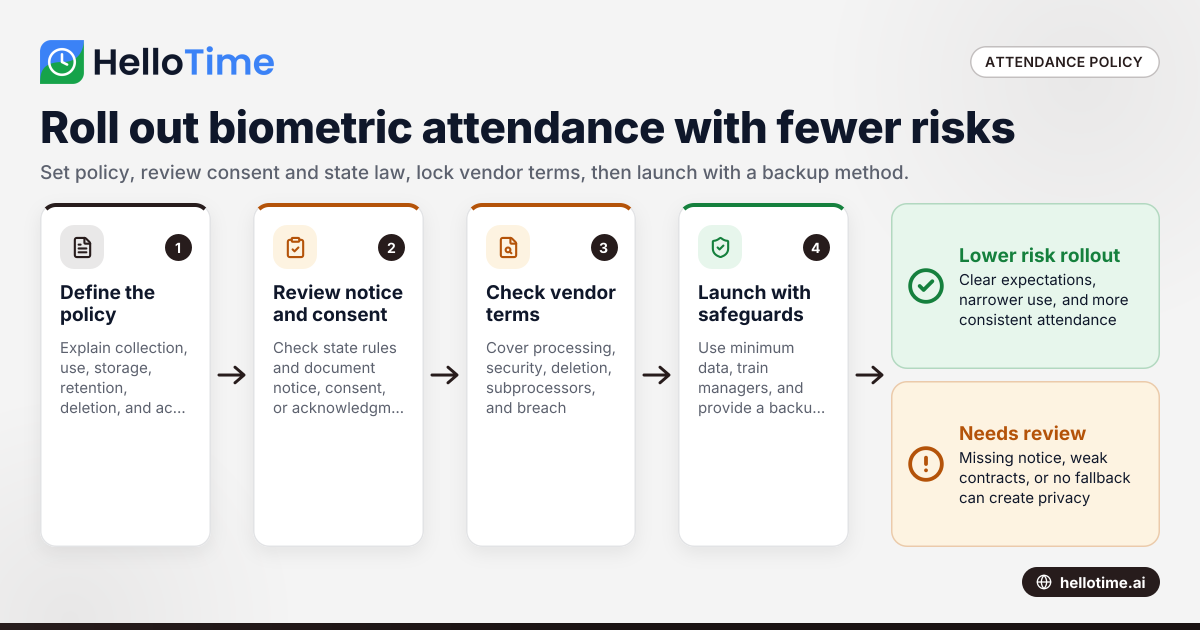
A biometric attendance policy in the United States tells employees what data you collect, why you collect it, how long you keep it, who can access it, and how they can raise concerns. If you use face recognition or fingerprint-based clock-in, a clear written policy helps reduce risk, set expectations, and support consistent attendance practices.
Key takeaways
- A biometric attendance policy should explain collection, use, storage, retention, deletion, and employee notice in plain language.
- Face recognition for attendance can create privacy and legal risk if you collect data without clear notice, consent, and vendor controls.
- Small businesses should review state privacy and biometric laws before rollout. Rules vary by state and use case.
- Your vendor contract should cover data processing, security, deletion, subcontractors, and breach notification.
- Keep biometric attendance optional where needed, and define a backup clock-in method for employees who do not enroll.
- General information only. This is not legal or tax advice.
What is a biometric attendance policy in United States?
A biometric attendance policy in United States is a written policy for using biometric data to track time and attendance. In a small business, that usually means face recognition at a tablet kiosk, a fingerprint scanner, or another system that measures a person’s physical traits to confirm identity at clock-in and clock-out.
The policy should answer basic questions in simple terms. What data are you collecting? Why are you collecting it? Is the system storing an image, a template, or both? Who can see the data? How long will you keep it? When will you delete it? What happens if an employee refuses enrollment or a scan fails?
For a small employer, the goal is not to write a perfect legal memo. The goal is to create a practical document that managers can follow every day. A good policy also helps during onboarding, audits, vendor reviews, and employee questions.
Biometric systems can reduce buddy punching and improve attendance accuracy. But they also require more care than a PIN or paper sign-in sheet. Employees may see face scans as sensitive. State laws may treat biometric identifiers and biometric information differently from ordinary employee records. That is why your policy should be paired with a notice, consent process where required, and a contract review with your software vendor.
Why does face recognition for attendance need special handling?
Because biometric data is sensitive and hard to replace. If a password leaks, you can reset it. If a face template or fingerprint template is mishandled, the employee cannot simply change that trait.
That practical difference affects trust, policy design, and legal risk. Employees often accept attendance tracking when they understand the business purpose, the alternatives, and the safeguards. They push back when the process feels hidden, excessive, or permanent.
Face recognition also raises technical questions that should be addressed in your policy and rollout plan:
What is stored Some systems store a photo, some create a mathematical template, and some use both. Your policy should say which applies.
Where the data is stored Data may live on a kiosk device, in the cloud, or with a subprocesser. That should be known before rollout.
How matching works Is the system identifying a person from a group, or verifying a claimed identity at clock-in? Verification can be less intrusive than broad identification.
What happens on failure Lighting, camera angles, personal protective equipment, and appearance changes can affect scans. You need a backup method.
How ai biometric attendance is used If your vendor uses AI to detect a live face, reduce spoofing, or improve matching, your documents should describe that in plain terms.
For many small businesses, attendance is not the place to experiment. Keep the use narrow. Use biometric data only for time and attendance if that is the stated purpose. Do not quietly expand it to productivity scoring, behavior monitoring, or general surveillance.
What should a biometric attendance policy include?
A strong policy is specific enough to guide managers but short enough for employees to read. Most small businesses can cover the essentials in one to three pages, plus a separate consent form if needed.
Core sections to include
1. Purpose and scope
State that the system is used for attendance, timekeeping, and prevention of buddy punching or inaccurate clock-ins. Identify who the policy applies to, such as employees at retail stores in Chicago, field crews in Houston, or warehouse staff in Detroit.
2. Definition of biometric data
Describe the type of biometric identifier or biometric information used by your attendance system. Avoid vague language. If you use a face template generated from a kiosk camera, say that.
3. Business purpose
Explain why the business uses the system. Common reasons include accurate timesheets, lower manual corrections, fewer time theft issues, and easier supervisor review.
4. Notice and consent process
Explain when notice is given, what employees receive, and whether written consent is collected before enrollment. If your legal review says consent is required in your state or situation, build that into onboarding.
5. Collection and enrollment
Describe how enrollment happens. Who captures the initial scan? Is a photo taken? Can the employee review the process? Is enrollment mandatory for all roles or only certain locations?
6. Use limitations
State that biometric data is used only for attendance-related identity verification. Ban unrelated uses unless you later update the policy and provide fresh notice where needed.
7. Retention and deletion
Set a retention schedule. State when data is deleted after employment ends or after the business purpose is satisfied. Do not keep biometric data forever by default.
8. Storage and security
List the basic safeguards. Limit access by role. Use encryption where available. Log administrative access. Require secure transmission and vendor security controls.
9. Vendor and subprocessors
Name the type of service providers involved, such as cloud hosting or attendance software. State that they are contractually restricted to approved purposes.
10. Employee rights and questions
Tell employees who to contact with questions, correction requests, or complaints. Make sure managers know how to escalate an issue.
A practical drafting tip
Write the policy for real use, not for a filing cabinet. If a store manager cannot explain the policy in one minute, it is probably too vague or too dense.
Do small businesses in the United States need employee consent?
Often, yes, or at least clear notice and a documented acknowledgment process. Whether consent is legally required depends on state law, the kind of biometric data involved, and how the system is deployed.
That short answer is why legal review matters before launch. State biometric and privacy rules are not uniform. A policy that works in one state may be incomplete in another. For example, your obligations may change based on whether you collect biometric identifiers directly, whether you share data with a vendor, and whether your notice includes retention and deletion terms.
Even when a specific written consent rule does not clearly apply, consent can still be a smart risk-control step. It improves transparency. It gives HR a clean onboarding record. It also reduces the chance that employees feel surprised by the system later.
For a small business, the practical approach is:
- Review the states where your employees work.
- Identify whether biometric-specific rules may apply.
- Decide whether to require consent for all employees for consistency.
- Keep signed records with onboarding documents.
- Offer a non-biometric backup method if your legal or employee-relations review recommends it.
If your workforce spans multiple states, use the highest workable standard across locations where possible. That reduces administrative confusion.
What should be in a consent form for biometric attendance?
A consent form should clearly say what biometric data is collected, why it is collected, how it will be used, how long it will be kept, when it will be deleted, and which service providers help process it. It should also identify who employees can contact with questions.
Under that simple summary, include practical details. The form should match your policy, vendor setup, and real retention practice. If your form says data is deleted when employment ends, your system and offboarding checklist should support that result.
Include these items in the form
- Employee name and role
- Type of biometric used, such as facial template for kiosk attendance
- Purpose, limited to attendance and identity verification
- Whether a photo, template, or both are stored
- Retention and deletion timing
- Disclosure of service providers involved in processing
- Statement of voluntary consent if that is your legal model
- Contact for HR or privacy questions
- Signature and date
Avoid these common mistakes
- Saying the data may be used for any business purpose
- Omitting retention and deletion terms
- Hiding vendor involvement in fine print
- Using technical language employees cannot understand
- Relying on verbal consent only
How do data processing agreements fit into biometric attendance?
A data processing agreement sets rules for how your vendor handles biometric and attendance data on your behalf. It should define purpose limits, security duties, deletion rules, subcontractor terms, and breach notice expectations.
That short answer matters because your policy is only half the job. If your contract lets a vendor keep broad rights over the data, your internal promises may not mean much in practice.
Key contract points to review
Purpose limitation
The vendor should process data only to provide the attendance service. Avoid broad language that permits unrelated product development, marketing, or undefined internal use.
Data return and deletion
The agreement should explain what happens at contract end. Can you export records? When is biometric data deleted from production systems and backups? Who confirms deletion?
Security obligations
Look for commitments around encryption, access controls, logging, incident response, and personnel restrictions. If your customers expect vendor oversight, this review also supports procurement and SOC 2-style diligence.
Subprocessors
If the vendor uses other service providers, the contract should address that. You should know whether cloud hosting or image-processing providers are involved, and what controls apply.
Breach notification
The agreement should define how and when the vendor tells you about a security incident. It should also clarify what support you receive for investigation and response.
Assistance with requests and disputes
If an employee asks about deletion or objects to processing, your vendor should be able to help you find and act on the relevant records.
A small business does not need a 40-page contract to ask smart questions. It does need a checklist and someone accountable for vendor review. If you are evaluating tools, focus on practical controls you can confirm. You can also review HelloTime’s features to see how attendance, kiosk use, and workforce workflows fit together operationally in one system.
How should you roll out a biometric attendance system?
A careful rollout reduces confusion, resistance, and cleanup work. The biggest problems usually come from rushing enrollment before policy, training, and fallback procedures are ready.
Step 1: Map your use case
Start with the business problem. Are you stopping buddy punching at one location? Replacing paper timesheets across three stores? Tight use cases are easier to explain and govern.
Step 2: Review state law and internal policy
Have HR and counsel review your planned workflow. Confirm whether your notice, consent, retention, and deletion steps fit your states and your workforce structure.
Step 3: Configure the system conservatively
Use the minimum data needed. Turn off features you do not need. Limit admin access. Set retention defaults before the first employee enrolls.
Step 4: Prepare employee documents
Issue the policy, consent form where used, and a short FAQ. During training, explain how scans work, what is stored, and what happens if a scan fails.
Step 5: Offer a backup clock-in method
Always define an alternative. This could be manager-assisted clock-in, badge plus PIN, or manual review for exceptions. The backup method should be documented, not improvised.
Step 6: Train managers
Managers should know how to enroll employees, handle refusals, escalate privacy questions, and avoid off-policy uses of the system.
Step 7: Audit after launch
Review access logs, failed scans, deletion events, and employee complaints after the first 30 to 60 days. Small issues become big issues when nobody owns follow-up.
What risks should small businesses watch for?
Most biometric attendance failures are not dramatic hacks. They are process mistakes. A manager enrolls workers before notice is given. A vendor keeps data longer than expected. A company cannot explain what a kiosk stores. An employee leaves, but deletion never happens.
Common risk areas
Overcollection
Do not capture more than you need. If attendance can work with a template rather than a stored image, understand that distinction and document it accurately.
Weak retention practices
Biometric data should not stay in old systems forever. Tie deletion to offboarding and contract termination procedures.
Hidden vendor use
Your vendor relationship should be transparent. If another provider touches the data, that should be reviewed and covered contractually.
No backup process
Face recognition can fail. Glasses, lighting, hats, masks, dirt, or camera placement can all create issues in the real world.
Inconsistent manager behavior
A policy only works if supervisors follow it. Train them to avoid ad hoc fixes and side systems.
Expansion without notice
If attendance data later gets used for discipline analytics or broader surveillance, your original explanation may no longer fit. Update documents before changing purpose.
A sample policy outline for a small business
Below is a practical outline you can adapt with legal review:
1. Policy title
Biometric Attendance and Timekeeping Policy
2. Purpose
We use biometric verification for time and attendance to improve clock-in accuracy and reduce buddy punching.
3. Scope
This policy applies to employees who use company attendance devices or kiosks at covered locations.
4. Data collected
The system may capture a facial scan and convert it into a biometric template for identity verification during clock-in and clock-out.
5. Business use
Biometric data is used only for attendance, timekeeping, related approvals, and investigation of timekeeping discrepancies.
6. Notice and consent
Employees receive notice before enrollment. Where required or adopted by company practice, written consent is obtained before collection.
7. Retention and deletion
Biometric data is retained only as long as needed for the attendance purpose and is deleted according to company retention rules after employment ends or the purpose is complete.
8. Storage and access
Access is limited to authorized personnel. Data is stored and transmitted using reasonable security controls appropriate to the system.
9. Service providers
Approved service providers may process biometric attendance data only to support the attendance service under contract restrictions.
10. Questions
Employees may contact HR or the designated privacy contact with questions about this policy or their data.
Read next
This article covers one part of a bigger topic. For the complete picture, read our guide to gdpr dpdp dpa.
Keep reading
Related articles
How United States Businesses Can Use GPS Geofence Attendance to Improve Field Staff Management
GPS geofence attendance uses location-based technology to track when field employees enter or leave a designated work zone. This method automates.
How Biometric Attendance Kiosks with Face Recognition Improve Workforce Management for United States Small Businesses
Biometric attendance kiosks with face recognition use AI technology to capture employee attendance quickly and accurately without physical contact.
How the DPDP Act 2023 Impacts Employee Attendance and Timesheet Data Management in Indian SMEs
The Digital Personal Data Protection (DPDP) Act 2023 is India’s law regulating how personal data, including employee attendance information, must be.