GPS Geofence Time Clock for Construction Crews in United States: How Small Contractors Can Verify Site Arrivals and Clean Up Payroll Hours
A GPS geofence time clock for construction crews helps small contractors verify that employees clock in and out at the right jobsite, not from the.
The HelloTime team
12 min read
On this page
A GPS geofence time clock for construction crews helps small contractors verify that employees clock in and out at the right jobsite, not from the road, home, or another project. In the United States, it can reduce buddy punching, tighten payroll hours, and give supervisors cleaner attendance records without adding more paperwork.
Key takeaways
- A geofenced time clock uses a virtual boundary around each jobsite to allow or verify clock-ins at the correct location.
- Construction contractors can use GPS data, photo capture, tablet kiosks, and approval workflows to reduce timecard disputes.
- Better site-arrival records lead to cleaner payroll inputs, more accurate job costing, and fewer billable hours slipping through the cracks.
- The best setup is simple for crews in the field and practical for foremen, payroll staff, and office managers.
- In the United States, location tracking and time records should be handled carefully and communicated clearly to employees. This is general information, not legal advice.
Why construction contractors in the United States are adopting geofenced time clocks
Small construction businesses often start with paper timecards, text messages, and spreadsheet edits. That works for a while. Then jobs multiply, crews split across sites, and payroll becomes a weekly cleanup project.
A framing contractor in Houston might have one crew on a retail build-out and another on a tenant improvement job across town. A concrete subcontractor in Chicago may move workers between two sites in the same day. If clock-ins come through by phone call or handwritten notes, it is hard to confirm who arrived where and when.
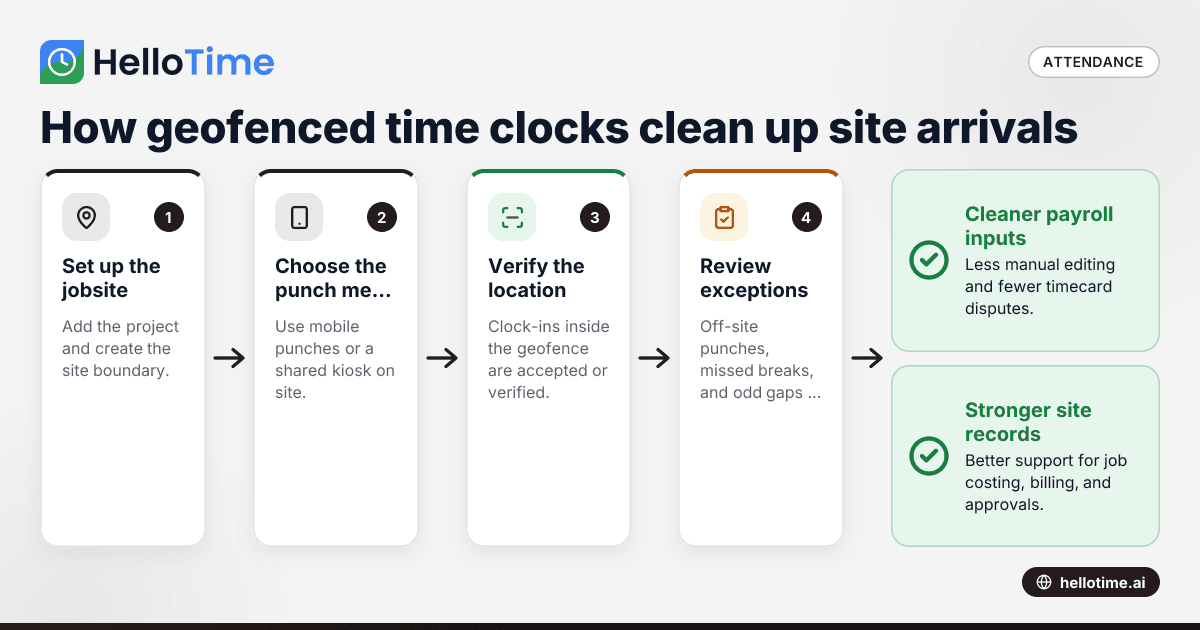
That is where a gps geofence time clock for construction crews becomes useful. The software creates a virtual boundary around a jobsite. When workers clock in, the system checks whether they are inside that approved area. If they are not, the clock-in can be blocked, flagged, or sent for review.
This approach does not solve every attendance problem. It does solve a common one. It gives contractors a more reliable first record of site arrival.
For small businesses, that matters because payroll errors are expensive in both directions. Overpaid time hurts margins. Underpaid time creates employee frustration and rework. In construction, both problems can spread fast across crews, overtime, and job cost codes.
How does a GPS geofence time clock work?
It creates a virtual jobsite boundary and checks whether a worker is inside it when clocking in or out. For small contractors, that means fewer disputed arrivals, less manual editing, and better payroll inputs.
Most systems follow a simple process:
Create a jobsite Add the project address, customer name, and any internal job code.
Draw the geofence Set a radius around the site. A small infill site may need a tighter boundary. A large commercial project may need a wider one.
Assign workers or crews Link employees, foremen, or subcontracted staff to that site if needed.
Workers clock in by phone or kiosk On arrival, they use a mobile app or a shared tablet kiosk at the entrance or trailer.
The system checks the location If the device is inside the geofence, the clock-in is accepted or verified. If not, it may be flagged.
Managers review exceptions Late arrivals, off-site punches, missed breaks, or odd time gaps go to supervisors for approval.
Approved hours move to payroll and job costing Clean records mean fewer edits before export or manual payroll entry.
On a real jobsite, the details matter. GPS accuracy can vary near tall structures, steel framing, underground levels, and dense urban sites like downtown Detroit. That is why many contractors use geofencing with approvals, notes, and photos rather than treating location alone as the full truth.
What problems does it actually fix on construction jobs?
It verifies site arrivals, reduces off-site clock-ins, and cuts down on manual timecard corrections. It also gives office staff clearer records when payroll, job costing, or customer billing needs support.
The biggest gains usually come from routine issues, not dramatic fraud. Most small contractors deal with preventable messes like these:
1. Early clock-ins before workers reach the site
A worker may clock in from a truck, gas station, or coffee stop. Sometimes it is accidental. Sometimes it is not. Geofencing helps tie the punch to the actual project location.
2. Buddy punching
One employee clocks in for another. This is harder when clock-ins depend on the device location, a photo, or a face-recognition kiosk.
3. Wrong job coding
Workers may spend the day on Site B but enter time against Site A. If they clock in through the assigned geofence, there is less room for mix-ups.
4. End-of-week reconstruction
Office staff often piece together hours from texts, calls, and memory. A live attendance trail removes much of that reconstruction work.
5. Payroll padding through small time leaks
Five or ten extra minutes at the start and end of shifts may not sound serious. Across a 20-person crew, over several projects, that can become a material payroll cost.
6. Weak support for customer disputes
If a customer questions labor hours, better arrival records help support your job logs and daily reports.
Where geofencing fits into construction payroll cleanup
Payroll problems in construction often start long before payroll day. If the first clock-in is wrong, every later calculation can be wrong too.
A geofence time clock improves the quality of the raw attendance data. That has a direct effect on payroll operations:
Fewer manual edits
Payroll staff spend less time calling foremen to ask who was actually on site at 7:02 a.m. and who arrived at 7:35 a.m.
Better overtime visibility
When hours are captured closer to real time, managers can spot long days sooner and make schedule changes before overtime grows.
Cleaner supervisor approvals
Instead of approving a vague weekly total, foremen can review actual daily punches and location exceptions.
More accurate job costing
Labor is one of the biggest cost drivers on most projects. If site time is recorded correctly, project profitability reporting gets more useful.
Stronger billing support for time-and-material work
For contractors who bill based on labor hours, verified site attendance creates a cleaner basis for invoicing.
This is also where a tool like HelloTime can help. Contractors that need GPS and geofenced clock-in, tablet kiosk attendance, approvals, leave tracking, and project time records can review the available features to see if the setup fits their field workflow.
What should a small contractor look for in a geofence time clock?
Look for easy setup, reliable mobile clock-ins, clear exception alerts, and simple approvals. In construction, the best system is the one crews will actually use every day.
After that quick answer, focus on field realities. A construction time clock should work for office staff and crew leaders, not just software buyers.
Simple geofence setup by address or map
You should be able to create a site quickly. If every new project takes too many steps, supervisors will stop updating locations.
Mobile clock-ins with low friction
Crews need a fast punch flow. If workers must tap through several screens while unloading tools, adoption drops.
Shared kiosk support
Some sites work better with a tablet kiosk in the trailer or at the gate. This is useful when employees do not use personal phones for work.
Photo or face-based verification options
These features add another layer of confidence. They can help on sites with high turnover or frequent shift overlap.
Approval workflows
Supervisors should review exceptions without wading through every punch. Good software highlights only what needs attention.
Job and project tagging
Construction businesses need labor hours tied to the right customer, project, and task where possible.
GPS records without overcomplication
You want enough location data to verify attendance. You do not want a system so complicated that crews fight it every day.
Reporting that helps payroll
Look for exportable timesheets, missed-punch alerts, and clean pay-period summaries.
How to roll out a gps geofence time clock for construction crews
A poor rollout creates resistance. A simple rollout creates trust.
Here is a practical way to introduce the system across a small contractor team.
1. Start with one or two active jobsites
Do not roll out to every project on day one. Pick jobs with stable crews and supervisors who will follow through.
2. Set realistic geofence sizes
A downtown site in Chicago may need a tighter radius than a large warehouse project outside Houston. Test the boundary on site before launch.
3. Decide the punch method for each crew
Use mobile punches for dispersed teams. Use a kiosk where workers all enter through one point.
4. Write a plain attendance policy
Explain:
- when employees should clock in and out
- where they should punch
- what happens if they forget
- who approves exceptions
- whether location is checked only at punch time or more broadly
Keep the policy short. Review it in person.
5. Train foremen first
If crew leaders do not understand the system, they will create side workarounds by text or phone. Train them before field staff.
6. Run a short parallel test
For one pay period, compare the new records with your current process. This reveals geofence issues, device gaps, and approval bottlenecks.
7. Review exceptions daily, not weekly
A same-day correction is easy. A Friday afternoon reconstruction is not.
8. Measure results
Track:
- number of missed punches
- number of manual payroll edits
- time spent preparing payroll
- disputed hours
- labor variance by project
Using ai gps geofence tools without overpromising
Some buyers now look for ai gps geofence features because they want software that flags suspicious punches automatically. That can be useful, but the practical value is in exception handling, not marketing language.
For example, software may help identify patterns like repeated off-site clock attempts, unusual early punches, or time entries that do not match the assigned project. That is helpful when it saves a supervisor time.
Still, no system should be treated as perfect. GPS can drift. Workers can have dead batteries. A foreman may move a crew to a nearby access point outside the original geofence. The best setup combines location checks with human review.
For small contractors, the goal is not surveillance for its own sake. The goal is cleaner attendance records, less payroll friction, and fair pay based on real site time.
Common mistakes contractors make with geofenced attendance
Even good software fails when the setup is weak. Watch for these common issues.
Making the geofence too small
A tight fence can reject valid punches near loading zones, parking areas, or side entrances. Test actual site access paths before locking the radius.
Ignoring multi-entry jobsites
Large projects often have several access points. One boundary may not fit every crew route or staging area.
Skipping supervisor accountability
If no one reviews flagged punches, the software becomes another layer of noise. Someone must own exception review.
Using geofencing without a backup plan
Phones die. Signals weaken. Crews change devices. You need a process for missed punches and manual corrections.
Not explaining the reason for the change
Workers are more likely to accept the system when they understand it protects fair pay and reduces payroll mistakes.
Expecting location data to replace all site records
You still need foreman notes, project logs, and job reporting. Geofence attendance is one useful record, not the whole record.
Choosing between mobile punches and a kiosk on construction sites
Construction companies often ask which setup is better. The answer depends on the job.
Mobile punches are best when:
- crews travel between sites
- employees start at different times
- there is no central entry point
- foremen need flexibility in the field
Tablet kiosks are best when:
- everyone starts from one location
- personal phone use is inconsistent
- the site has a trailer, office, or gate station
- you want one shared device with added identity checks
Many contractors use both. A shop team may use a kiosk at the yard, while field installers use mobile punches at jobsites.
How geofenced time data supports job costing and billing
Attendance accuracy is not just a payroll issue. It affects margins.
If labor hits the wrong job, your project reports become less useful. If workers clock in before arriving, labor cost on that job may look higher than it should. If billable field hours are not captured properly, revenue can slip.
With better site-based time records, contractors can:
- compare estimated labor to actual labor faster
- spot jobs that are running hot on labor
- support time-and-material invoices with stronger documentation
- reduce arguments between payroll and operations
- understand crew utilization by site and shift
For a small contractor, these improvements can matter as much as the attendance control itself. Better time data supports better decisions.
Implementation checklist for small U.S. contractors
Before you choose a system, use this short checklist.
Operational checklist
- List every active jobsite and expected crew size.
- Decide which sites need mobile punches and which need kiosks.
- Choose who creates geofences and who approves exceptions.
- Define the process for missed punches.
- Test geofence accuracy on live jobsites.
Payroll checklist
- Confirm the pay period and approval cutoff.
- Identify which reports payroll needs each cycle.
- Decide how hours move into your payroll process.
- Check how job codes map to your estimating or accounting workflow.
- Review overtime visibility before going live.
Employee communication checklist
- Tell employees what data is collected.
- Explain when location is checked.
- Explain who can see and review records.
- Share the correction process for errors.
- Put the policy in writing and keep it easy to read.
Is geofenced time tracking enough on its own?
No. It is a strong attendance control, but it works best with approvals, clear job assignments, and simple policies. Contractors get the best results when location checks support supervisor review instead of replacing it.
That matters on busy sites where access points change and crews shift during the day. A practical system should help you catch exceptions quickly, not create new admin work. If you are evaluating options, HelloTime’s HelloTime in the US page can help you see whether the product fits a United States-based team.
Frequently asked questions
Is a GPS geofence time clock accurate enough for construction sites?
It is usually accurate enough to verify general site arrival, but it is not perfect in every environment. Dense urban areas, indoor spaces, and signal interference can affect readings, so approvals and exception review still matter.
Can workers clock in if they are just outside the geofence?
That depends on the rules you set. Some systems block the punch, while others allow it and flag it for review. A practical setup balances control with real-world site access conditions.
Read next
This article covers one part of a bigger topic. For the complete picture, read our guide to gps geofence.
Keep reading
Related articles
How Biometric Attendance Kiosk Mode Can Streamline Workforce Management for Indian Manufacturing Units
Manufacturing units in India often struggle with managing workforce attendance accurately and efficiently. Errors in attendance tracking lead to.
Choosing the Right Attendance App for Small Businesses in Bengaluru
Choosing the Right Attendance App for Small Businesses in Bengaluru ===================================================================== If you run.
Using WhatsApp for Clock-In and Attendance Tracking in Indian Small Businesses
Using WhatsApp for Clock-In and Attendance Tracking in Indian Small Businesses The cost of managing attendance poorly can be high for small.