Small Business Payroll Taxes in United States: How to Estimate FICA, Federal Withholding, and Timesheet-Based Gross Pay
Payroll taxes for a small business in the United States start with three moving parts: gross pay, employee tax withholding, and employer payroll tax.
The HelloTime team
12 min read
On this page
Payroll taxes for a small business in the United States start with three moving parts: gross pay, employee tax withholding, and employer payroll tax expense. If your hours are messy, your estimates will be messy too, so the fastest way to improve payroll accuracy is to start with clean timesheets, then calculate FICA and federal withholding from reliable gross wages.
Key takeaways
- Small business payroll taxes in United States usually begin with gross pay, Social Security, Medicare, and federal income tax withholding.
- Accurate timesheets matter because regular hours, overtime, paid time off, and unpaid time all affect taxable wages.
- FICA includes employee withholding and a matching employer share for Social Security and Medicare.
- Federal income tax withholding depends on each employee’s Form W-4 and IRS withholding methods.
- Payroll tax rules can change, and state and local taxes may also apply, so this article is general information, not legal or tax advice.
- Time tracking software can reduce payroll errors by turning approved hours into cleaner payroll inputs.
What are small business payroll taxes in United States?
Small business payroll taxes in United States are the taxes you withhold from employee wages and the taxes your business pays as an employer. For most employers, that includes Social Security and Medicare taxes under FICA, plus federal income tax withholding based on the employee’s Form W-4.
In practice, payroll taxes sit on top of gross pay. That means your first job is to calculate wages correctly. If a restaurant in Chicago misses overtime hours, or a field service company in Houston forgets drive-time rules built into its policy, the tax estimate will be wrong before payroll taxes even enter the picture.
For many small businesses, payroll gets complicated for three simple reasons:
- Hours are tracked in spreadsheets or on paper.
- Managers approve time late or make edits by text or email.
- Gross pay changes every pay period because schedules change.
That is why timesheet discipline matters as much as tax math.
How do you estimate gross pay from timesheets?
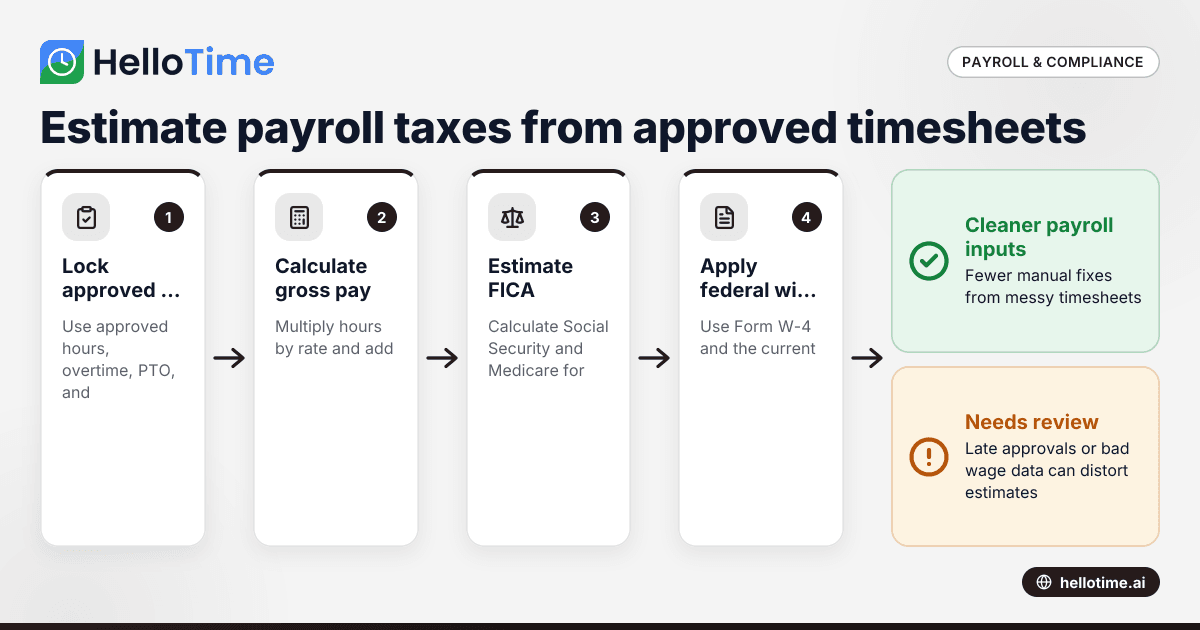
Start with approved hours and pay rules. Multiply regular hours by the base rate, add overtime premiums where required, include paid earnings like bonuses if applicable, and separate unpaid time so it does not flow into taxable wages by mistake.
Gross pay is the foundation of every payroll tax estimate. If you understate gross wages, you under-withhold taxes. If you overstate them, you may create avoidable corrections and employee questions.
Step 1: Gather the timesheet inputs
Before you estimate taxes, pull together the pay period data:
- Employee name
- Pay rate
- Exempt or nonexempt status
- Regular hours worked
- Overtime hours
- Paid time off hours
- Unpaid time off hours
- Any reimbursements
- Any bonuses or commissions for the period
For hourly teams, the cleanest source is an approved timesheet. For shift-based businesses, the source may be a schedule plus actual clock-in and clock-out records. For office teams and agencies, billable and non-billable hours may both matter for payroll even if only some hours are invoiced.
Step 2: Calculate regular pay
Multiply regular hours by the employee’s regular hourly rate.
Example:
- 72 regular hours
- $22.00 per hour
Regular pay = 72 × $22.00 = $1,584.00
This is straightforward when a worker has one rate. It gets harder when a business uses multiple rates for different job types, locations, or clients. In those cases, each block of time should be multiplied by the correct rate before you total wages.
Step 3: Add overtime pay
Nonexempt employees may be owed overtime under federal law and sometimes state law. Federal overtime rules often use a workweek standard, not simply a pay-period total, so businesses need to review hours by week.
A simple example:
- 8 overtime hours
- Regular rate: $22.00 per hour
- Overtime rate: $33.00 per hour
Overtime pay = 8 × $33.00 = $264.00
Step 4: Add other taxable earnings
Depending on the pay period, gross wages may also include:
- Bonus pay
- Commissions
- Shift differentials
- Certain paid leave amounts
Not every payment is treated the same way for tax purposes. Reimbursements, for example, should not be casually mixed into wage totals. Keep wage items and non-wage items separate.
Step 5: Total gross pay
Using the examples above:
- Regular pay: $1,584.00
- Overtime pay: $264.00
Estimated gross pay = $1,848.00
That gross pay figure is the starting point for withholding and employer payroll tax estimates.
What is included in FICA?
FICA covers Social Security and Medicare taxes. Employees have these taxes withheld from wages, and employers generally match those amounts with their own share.
FICA is often the easiest payroll tax to estimate because the rates are fixed under federal law, though wage limits and special situations can affect the final result. You still need current IRS rules for the year you are processing payroll.
Social Security tax
Social Security tax applies up to the annual wage base for that calendar year. Once an employee reaches that wage base, Social Security withholding generally stops for the rest of the year.
For estimation, this means you need two pieces of information:
- Current taxable wages for the pay period
- Year-to-date taxable Social Security wages
If the employee is far below the annual wage base, the estimate is simple. If the employee is close to it, only part of the current wages may be subject to Social Security tax.
Medicare tax
Medicare tax generally applies to all Medicare wages without the same annual wage cap used for Social Security. Higher earners may also be subject to Additional Medicare Tax withholding once they pass the federal threshold for the year.
That extra withholding is an employee withholding issue. It is not matched by the employer in the same way as the base Medicare tax.
A simple FICA estimate example
Assume an employee has:
- Gross taxable wages this pay period: $1,848.00
- Year-to-date wages well below the Social Security wage base
- No Additional Medicare Tax issue
Using current federal FICA rates for a standard estimate:
- Employee Social Security withholding: $1,848.00 × 6.2% = $114.58
- Employee Medicare withholding: $1,848.00 × 1.45% = $26.80
- Total employee FICA withholding = $141.38
Employer FICA estimate:
- Employer Social Security expense: $114.58
- Employer Medicare expense: $26.80
- Total employer FICA expense = $141.38
Combined FICA impact for this payroll record:
- $141.38 withheld from the employee
- $141.38 paid by the employer
Why FICA estimates go wrong
FICA errors usually come from payroll setup or wage classification problems, not the rate itself. Common causes include:
- Wrong year-to-date wage totals
- Missing taxable earnings
- Incorrect handling of pre-tax deductions
- Duplicate time entries
- Off-cycle payroll adjustments not reflected in reports
For an ai small business workflow, the useful role of automation is not guessing taxes. It is collecting approved time, flagging unusual hours, and creating a consistent wage base before payroll is calculated.
How do you estimate federal income tax withholding?
Use the employee’s Form W-4 and the current IRS withholding method for your payroll frequency. There is no single flat rate for every employee, so the estimate depends on wage amount, filing choices, and any extra withholding the employee requested.
Federal withholding is more variable than FICA. Two employees with the same gross pay can have different federal withholding amounts because their Form W-4 entries differ.
The inputs you need
To estimate federal income tax withholding, gather:
- Gross wages for the pay period
- Payroll frequency
- The employee’s current Form W-4
- Any pre-tax deductions that reduce taxable wages
- IRS withholding tables or percentage method for the current year
This is why old spreadsheet templates often break. They may still assume outdated withholding logic, or they may not reflect the employee’s latest W-4.
A practical way to estimate withholding
For small businesses, the most reliable process is:
- Start with gross pay from approved timesheets.
- Adjust for any applicable pre-tax deductions.
- Identify taxable federal wages for the period.
- Apply the current IRS withholding method using the employee’s W-4.
- Add any extra withholding the employee requested.
Because federal withholding is rule-based and employee-specific, many businesses use payroll software or accountant-reviewed payroll workflows for the actual calculation. If you are estimating before final payroll runs, treat your number as a planning estimate, not the final withholding amount.
Why federal withholding often changes
Federal withholding can change from one pay period to the next because of:
- Different hours worked
- Overtime spikes
- Bonuses
- W-4 updates
- Pre-tax deduction changes
- A switch in payroll frequency
A construction subcontractor in Detroit may see very different withholding amounts during a heavy overtime month than during a slower winter period. The tax math follows wages, so unpredictable hours create unpredictable withholding.
How do timesheets affect payroll tax accuracy?
Bad timesheets create bad gross pay, and bad gross pay flows into every payroll tax number. Accurate start and end times, approved overtime, and clear leave codes help you estimate taxes with fewer manual fixes.
Timesheet errors that create payroll tax problems
The most common timesheet issues are simple:
- Missing clock-outs
- Duplicate entries
- Manual rounding that is not applied consistently
- Overtime approved after payroll close
- PTO tracked in a separate sheet
- Different managers using different codes
These errors can lead to underpayments, overpayments, or payroll corrections. They also make it harder to answer employee questions after payday.
Why approvals matter
Approval is not just an admin step. It is the moment when managers confirm that:
- The employee worked the recorded hours
- Overtime was authorized or at least acknowledged
- Leave codes are correct
- Job or project tags are accurate when needed
Without approvals, payroll teams often spend the last day of the pay cycle chasing updates by phone and email. That slows payroll and increases risk.
A better workflow for hourly teams
A practical payroll-ready workflow looks like this:
- Employees record time daily.
- Managers review exceptions during the week, not only on payday.
- Overtime and leave are coded before the pay period closes.
- Final timesheets are approved by a clear deadline.
- Payroll uses approved hours as the wage input source.
That process is useful for retail, hospitality, field service, and manufacturing teams. It also helps agencies and service businesses that bill clients by the hour and need clean internal wage data.
A sample payroll tax estimate for one hourly employee
Let’s build a simple estimate for a biweekly payroll.
Employee details:
- Hourly rate: $22.00
- Regular hours: 72
- Overtime hours: 8
- No bonus
- No reimbursement included in wages
- Year-to-date wages below the Social Security wage base
- Standard federal withholding estimate to be calculated from current IRS method and Form W-4
Step 1: Gross pay
- Regular pay = 72 × $22.00 = $1,584.00
- Overtime pay = 8 × $33.00 = $264.00
- Gross pay = $1,848.00
Step 2: Employee FICA withholding estimate
- Social Security = $1,848.00 × 6.2% = $114.58
- Medicare = $1,848.00 × 1.45% = $26.80
- Total employee FICA = $141.38
Step 3: Employer FICA expense estimate
- Employer Social Security = $114.58
- Employer Medicare = $26.80
- Total employer FICA = $141.38
Step 4: Federal income tax withholding estimate
Use the employee’s Form W-4 and the current IRS method. This amount will vary by employee, so do not force a flat percentage unless your payroll provider or tax advisor confirms the method for your use case.
Step 5: Plan for total payroll cost
For budgeting, many small businesses want to know the employer’s cash impact. A simple starting view is:
- Gross pay: $1,848.00
- Employer FICA: $141.38
- Estimated payroll cost before other employer taxes or benefits: $1,989.38
That does not include all possible employer payroll costs. Federal unemployment tax, state unemployment tax, workers’ compensation, benefits, and other obligations may also affect your true payroll cost.
What should a small business track every pay period?
Track approved hours, gross wages, taxable wage adjustments, employee withholding, and employer payroll tax expense. Keep year-to-date totals current so wage limits and withholding changes are easier to catch.
Build a repeatable payroll checklist
A small business payroll checklist should include:
- Confirm pay period dates.
- Lock approved timesheets.
- Review overtime by workweek.
- Check PTO and unpaid leave codes.
- Verify new hires and terminations.
- Confirm any pay rate changes.
- Review bonuses or commissions.
- Update employee W-4 changes.
- Recalculate year-to-date wage totals.
- Estimate employee and employer payroll taxes.
This checklist reduces last-minute surprises. It also creates a cleaner audit trail when an employee asks how net pay was calculated.
Use reports that connect labor and payroll
Businesses often keep labor records in one place and payroll math in another. That split can work, but only if the handoff is clean. Time tracking tools are valuable when they create a direct path from worked hours to approved wages.
HelloTime helps businesses capture hours, attendance, leave, approvals, and labor reports in one system. If your team still runs payroll prep from spreadsheets, reviewing features can help you see what a cleaner timesheet workflow looks like for US teams.
Where software helps most with payroll prep
Software helps most before taxes are calculated. It reduces missing punches, standardizes approvals, keeps leave in the same workflow, and gives payroll a cleaner gross-pay starting point.
For many small businesses, the pain is not tax theory. It is operational mess. Managers text corrections. Supervisors email schedule changes. Someone updates PTO in a separate file. Then payroll has to reconcile everything on deadline day.
Good payroll prep systems reduce these risks
Look for tools that help you:
- Track time as it happens
- Review exceptions quickly
- Approve timesheets by deadline
- Separate paid and unpaid time
- Keep leave records tied to payroll periods
- Report labor by employee, team, or project
An ai small business owner does not need software that invents tax answers. They need software that makes payroll inputs trustworthy and repeatable.
If you want a product overview built for the US market, you can also see HelloTime in the US.
If you want to simplify time tracking, approvals, attendance, and leave before payroll runs, explore the HelloTime features or compare plans at pricing.
Frequently asked questions
Are payroll taxes the same as employee withholding?
No. Payroll taxes can include taxes withheld from employees and taxes paid by the employer. FICA includes both an employee withholding portion and an employer match.
Do timesheets matter for salaried employees too?
Yes, in some cases. Salaried businesses still use time records for attendance, leave tracking, job costing, project profitability, and compliance with internal pay policies.
Can I estimate federal withholding with a flat percentage?
Usually, that is not the best method for regular payroll. Federal income tax withholding depends on the employee’s Form W-4 and current IRS withholding rules.
Keep reading
Related articles
Using WhatsApp for Clock-In and Attendance Tracking in Indian Small Businesses
Using WhatsApp for Clock-In and Attendance Tracking in Indian Small Businesses The cost of managing attendance poorly can be high for small.
How User Mode Enhances Timesheet Approval Workflow for Indian Small Businesses
How User Mode Enhances Timesheet Approval Workflow for Indian Small Businesses.
HelloTime vs Deputy: Which Workforce Management Software is Best for United States Small Businesses?
HelloTime and Deputy are popular workforce management tools offering employee scheduling, time tracking, and attendance solutions for US small.