User Activity Tracking in Timesheet Software in the United States: What Small Businesses Should Record Without Turning Work Into Surveillance
User activity tracking in timesheet software should help small businesses verify work, improve billing, and spot process issues. In the United States.
The HelloTime team
12 min read
On this page
User activity tracking in timesheet software should help small businesses verify work, improve billing, and spot process issues. In the United States, the right approach is narrow and practical: record only the activity data you need for time accuracy, client accountability, attendance, and team planning, without monitoring people so closely that work feels like surveillance.
Key takeaways
- Good activity tracking supports timesheets. It should not become constant monitoring.
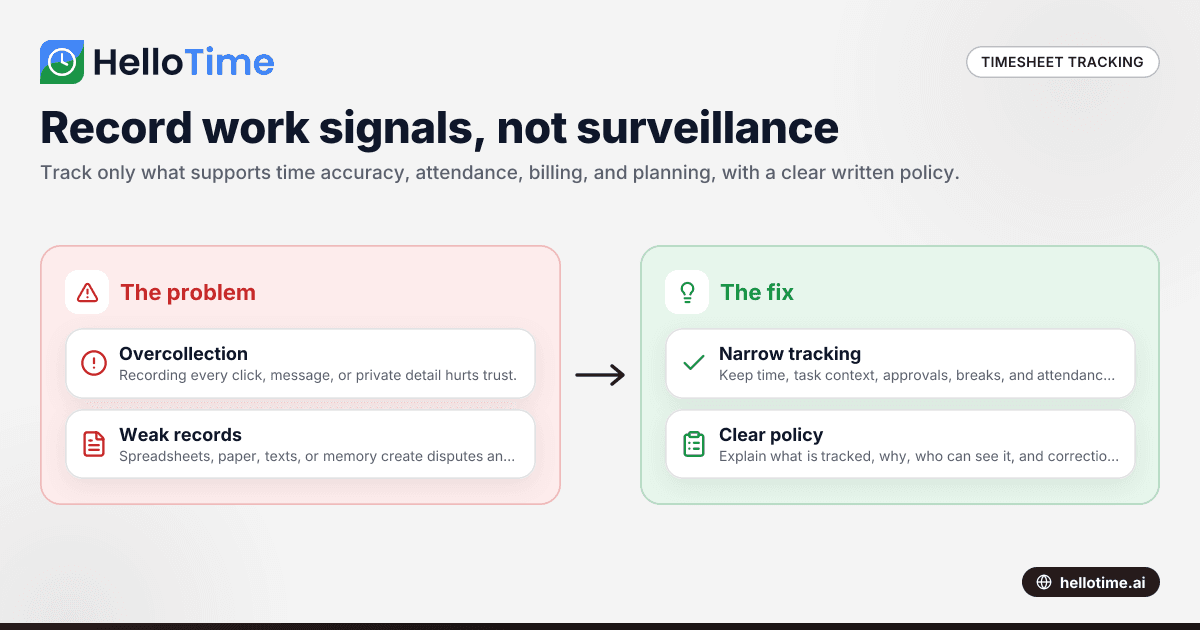
- Small businesses should record work-related signals, not every click, message, or private detail.
- The safest default is to track time, task context, approvals, and clear attendance events.
- Be transparent with employees. Tell them what is tracked, why, and who can see it.
- Use activity data to improve payroll inputs, billing support, scheduling, and coaching.
- In the United States, privacy and wage-and-hour questions can overlap, so set a clear written policy. This is general information, not legal advice.
What is user activity tracking in timesheet software in the United States?
User activity tracking in timesheet software means recording limited work signals that support accurate time entries and attendance records. For most small businesses in the United States, that means start and stop times, project or job selection, edits, approvals, breaks, location at clock-in when needed, and basic task context.
That is very different from full surveillance. A timesheet system does not need to capture every keystroke, webcam image, or private app usage to be useful. Most businesses get better results when they track only what helps answer a simple question: was this time worked, where did it belong, and can a manager review it fairly?
This matters because many small businesses still rely on spreadsheets, paper timesheets, text messages, or memory. That creates disputes, late approvals, and weak support for client billing. It also makes it harder to understand labor costs by customer, project, site, or shift.
The best version of user activity tracking timesheet software United States buyers should look for is focused on business records. It should help teams capture time with less friction, not more fear.
What should small businesses record?
Record only the activity data needed to verify hours, assign them correctly, and review exceptions. Good records usually include clock-in and clock-out times, project or shift selection, breaks, edits, approvals, and location only when the job requires it.
For most small businesses, that short list covers almost everything needed for timesheets. You do not need a broad collection of employee behavior data to run payroll inputs, bill clients, or manage attendance.
The core records that are usually worth keeping
Start with records that directly support timekeeping.
Clock-in and clock-out times This is the foundation. It creates a clear daily work record.
Project, client, task, job, or cost code This shows where the time belongs. It matters for agencies, contractors, and field teams.
Breaks and meal periods if your workflow requires them If your team records unpaid breaks, keep that data with the timesheet.
Manual edits and who made them An audit trail reduces disputes. Managers can see when a timesheet changed and why.
Approvals A simple approval record helps close the loop before payroll processing or invoicing.
Shift assignment versus actual attendance This helps operations teams compare planned labor to actual labor.
Location at clock-in when location matters GPS or geofenced attendance can be useful for field service, construction, retail, and multi-site operations.
Activity context that can help without becoming invasive
Some businesses also need lightweight context around the time entry.
- Notes on what was worked on
- The job site or store location
- A customer name
- A service ticket number
- Billable versus non-billable status
- Device or kiosk check-in record for shared worksites
These records support better review. They also help answer client questions later. For example, a Chicago design agency may need to show that 6.5 hours went to creative revisions for one customer. A Houston field service company may need to confirm that a technician clocked in at the right job site before starting the repair.
What usually crosses the line into surveillance
Many businesses do not need the following for timesheets:
- Continuous screen recording
- Webcam snapshots throughout the day
- Full browser history unrelated to work
- Logging every keystroke or mouse movement
- Access to personal messages or private accounts
- Always-on location tracking outside work hours
These practices can damage trust fast. They also create more sensitive data to store and protect. If a data point does not improve time accuracy, attendance, billing support, or scheduling, it probably does not belong in your timesheet process.
Why does this matter for trust and adoption?
Employees accept time tracking more easily when it feels fair, limited, and work-related. If the system seems designed to watch everything, people will resist it, work around it, or spend energy defending normal work patterns.
That hurts adoption. It also hurts the quality of your data. A team that trusts the system is more likely to clock in correctly, assign time to the right job, and approve timesheets on time.
Surveillance creates noise, not always better records
Small businesses often assume more data means more control. In practice, too much monitoring creates noise.
A manager should not need to inspect every minute of a workday to review a timesheet. They usually need to check for exceptions:
- Missing punches
- Very long shifts
- Unapproved overtime
- Time booked to the wrong project
- Repeated late arrivals
- Job-site attendance mismatches
Those are manageable and useful. They can be reviewed quickly. They also lead to clear action.
Activity tracking should support people doing real work
People do not work in perfectly measurable bursts. They think, talk, solve problems, wait for customer replies, drive between sites, and switch tasks. If your process treats only visible screen activity as “real work,” you will misread a lot of normal jobs.
This is especially true in professional services and field operations. A Detroit engineering consultant may spend 40 minutes reviewing plans away from the keyboard. A restaurant manager may spend a shift moving between staff coaching, vendor checks, and customer issues. Good timesheet systems should support those realities.
How can you use ai user activity without crossing the line?
Use ai user activity features to surface timesheet suggestions, missing entries, or unusual patterns for review. Do not let AI make hidden judgments about employee effort based on constant monitoring.
That is the best dividing line. AI should reduce admin work, not become a black box that scores people unfairly.
Good uses of AI in activity-supported timesheets
Used well, AI can help managers and employees complete records faster.
Examples include:
- Suggesting a project based on recent work patterns
- Flagging a missing clock-out
- Grouping repeated tasks into a draft timesheet
- Detecting a likely duplicate entry
- Noticing that a scheduled shift has no attendance record
- Highlighting timesheets that need manager review
These are practical uses. They save time and improve record quality.
Bad uses of AI in time tracking
AI becomes risky when it tries to infer too much from weak signals.
That includes:
- Guessing “productivity” from mouse movement alone
- Treating low keyboard activity as low effort
- Ranking employees without context
- Monitoring workers continuously with no clear business reason
- Making discipline decisions from automated scoring alone
Small businesses should be careful here. AI can amplify bad assumptions if the underlying data is incomplete or misleading.
What policy should you put in writing?
Create a short written policy that explains what activity data you collect, why you collect it, when it is used, and who can access it. Keep the policy tied to timekeeping, attendance, scheduling, billing support, and operational review.
A good policy prevents confusion. It also helps managers apply the system consistently.
What your policy should cover
Your policy does not need to be long. It does need to be clear.
Include these points:
What is tracked Name the specific records. For example: clock-ins, clock-outs, breaks, project selection, timesheet edits, approvals, and job-site location at clock-in.
What is not tracked This builds trust. If you do not record personal messages or off-hours location, say so.
Why the business tracks it Tie it to payroll inputs, attendance, client billing, scheduling, job costing, and fraud prevention.
Who can see the data Limit access to people with a business need, such as supervisors, HR, payroll staff, or operations managers.
When tracking applies Define whether it applies during scheduled shifts, while clocked in, or only on company devices for specific tasks.
How corrections work Employees should know how to fix missing or inaccurate entries.
How long records are kept Follow your retention practices and legal guidance.
Train managers before rollout
A weak rollout causes more problems than the software itself. Managers should know how to explain the policy and how not to misuse the data.
Train them to review exceptions, not to micromanage. The goal is better records and smoother approvals, not constant observation.
Which teams benefit most from limited activity tracking?
Shift-based teams and billable-hours teams usually benefit the most. They need accurate time records for attendance, labor planning, customer work, and cost control, but they do not need deep surveillance to get those outcomes.
Shift-based operations
Retail, hospitality, manufacturing, and field service teams often need:
- Clock-in and clock-out records
- Site or location confirmation
- Shift versus actual attendance comparison
- Break tracking
- Leave visibility
- Supervisor approvals
For these teams, the main issue is often attendance accuracy. A kiosk, geofence, or mobile clock-in can be enough.
Professional services and agencies
Teams that bill clients by the hour need:
- Project and task selection
- Billable and non-billable separation
- Notes for the work performed
- Timesheet approvals
- Support for invoicing and profitability review
For these teams, user activity tracking should help people remember where time went. It should not attempt to prove effort by monitoring every second.
Multi-site businesses
Businesses with crews or branch locations need stronger location discipline, but still within limits. Clock-in verification at the start of a shift can be reasonable. Tracking someone’s location all evening after they leave work is not.
How do you choose the right software setup?
Choose a setup that matches the work, limits overcollection, and gives managers clean approval tools. The best system is the one your team will use consistently and understand easily.
Start with the business problem, not the feature list
Before you buy, ask:
- Are timesheets late, inaccurate, or incomplete?
- Do employees forget to assign time to the right job?
- Do supervisors spend too long fixing errors?
- Do customers question billable hours?
- Do you need on-site attendance proof?
- Are spreadsheets causing payroll or invoicing delays?
Your answers tell you what activity signals matter. If your main issue is missed punches, you do not need detailed desktop monitoring. If your main issue is billable time leakage, you need better project-based time capture and approvals.
Look for controls that keep tracking proportional
Useful controls include:
- Role-based permissions
- Clear audit trails
- Location capture only at clock-in or clock-out
- Employee visibility into their own records
- Manager approval workflows
- Easy correction requests
- Simple reporting by project, employee, site, or shift
A practical system should reduce manual work. It should also make policies easier to follow.
For businesses reviewing options, HelloTime offers tools for time tracking, approvals, scheduling, GPS and geofenced clock-in, kiosk attendance, invoicing from billable hours, and profitability reporting. You can review the available features if you want to compare what a focused setup looks like for a small business in the United States.
What should you avoid when setting up activity tracking?
Avoid collecting data just because the software can collect it. Every extra data point creates more review work, more employee concern, and more responsibility for your business.
Common mistakes
Here are the biggest setup mistakes:
Tracking too much from day one Start narrow. Expand only if there is a clear business need.
Not telling employees what is tracked Surprise destroys trust.
Using one rule for office staff and another for field staff without explaining why Different roles can justify different controls, but the reason should be clear.
Treating activity signals as proof of performance Time data and performance management are not the same thing.
Skipping manager training Poor reviews create inconsistent approvals and conflict.
Ignoring data security and access control Sensitive employee records should not be broadly visible.
Keep records useful, not punitive
If every exception triggers suspicion, employees will stop seeing the system as an admin tool. They will see it as a trap. Use exceptions to ask questions, correct records, and improve processes.
That approach usually leads to better compliance and better data over time.
A practical rollout plan for small businesses
The best rollout is simple, documented, and easy to explain. You do not need a major compliance program to improve timesheets.
Step 1: Define the minimum data set
List the records you truly need. For many teams, that is:
- Clock-in and clock-out
- Breaks
- Project or shift assignment
- Edit history
- Approvals
- Location at clock-in if required
Step 2: Match tracking to each role
Office staff, field technicians, and retail teams may not need the same setup. Keep each setup tied to the actual job.
Step 3: Publish a plain-language policy
Use short sentences. Explain what is tracked and what is not.
Step 4: Train employees and managers
Show employees how to clock in, edit mistakes, and submit timesheets. Show managers how to review exceptions and approve fairly.
Step 5: Review after 30 days
Look for missing punches, approval delays, and policy confusion. Cut any tracking that is not helping.
Step 6: Connect time data to useful outcomes
The system should help your business move faster. That may mean cleaner approvals, better job costing, fewer billing disputes, or more accurate attendance records.
If you want a US-focused overview of the product setup, you can also see HelloTime in the US.
Small businesses do best when they treat activity tracking as a support tool for timesheets, not a surveillance program. Record the minimum that helps you verify time, assign labor accurately, and review exceptions fairly. If you want to explore a practical setup, see the product features or compare plans at pricing.
Frequently asked questions
Is user activity tracking the same as employee surveillance?
No. User activity tracking for timesheets can be very limited and work-related. It usually focuses on hours, project selection, edits, approvals, and attendance events rather than constant monitoring.
Should I track screenshots or keystrokes in a small business?
Usually not for timesheets. Most small businesses can manage payroll inputs, client billing, and attendance with far less invasive records.
Read next
This article covers one part of a bigger topic. For the complete picture, read our guide to user mo.
Keep reading
Related articles
How User Mode Enhances Timesheet Approval Workflow for Indian Small Businesses
How User Mode Enhances Timesheet Approval Workflow for Indian Small Businesses.
HelloTime vs Traditional Timesheet Approval Systems: Advantages for United States Small Businesses
HelloTime vs Traditional Timesheet Approval Systems: Advantages for United States Small Businesses When comparing HelloTime vs traditional timesheet.
How United States Small Businesses Can Optimize User Mode Settings to Streamline Timesheet Approval Workflows
In timesheet approval workflows, user mode customizes access and approval steps based on employee roles, allowing roles like employees, managers, and.