What to Do When an Employer Has Turned Off Your Time Tracking in the United States
When an employer has turned off time tracking, employees lose a key method to log their hours accurately. This can disrupt payroll, affect wage.
The HelloTime team
7 min read
On this page
When an employer has turned off time tracking, employees lose a key method to log their hours accurately. This can disrupt payroll, affect wage claims, and cause confusion about work schedules. It’s important to understand your rights and take steps to protect your time records in the United States.
Key takeaways
- Employers must pay employees for all hours worked, even if time tracking is disabled.
- Employees should document their hours manually if their employer stops time tracking.
- Communicating with HR or supervisors can clarify why time tracking was turned off.
- State laws vary on timekeeping rules, but federal law requires accurate wage payment.
- Legal advice may be needed if unpaid hours or other violations occur.
- Using workforce management software like HelloTime supports reliable time tracking and transparency.
Why would an employer turn off time tracking?
Employers might disable time tracking temporarily for system maintenance, software changes, or operational reasons. Sometimes it happens due to new policies or misunderstandings about employees’ tracking needs. In rare cases, it could be an attempt to reduce accountability around hours worked.
Understanding the reason behind turning off time tracking helps employees know how to respond. If it was a planned change, employers should communicate alternatives for recording hours worked. Failure to do so can lead to wage disputes.
Can an employer legally turn off time tracking?
An employer can change how they track time, but they cannot refuse to pay employees for all hours worked under the Fair Labor Standards Act (FLSA). Employers are required to maintain accurate records of employees’ working hours. Turning off electronic time tracking alone does not absolve them from paying wages.
Employees should remain vigilant and track their own hours during such changes. State labor laws may have additional mandates on time and wage recordkeeping, so be aware of your state’s rules if your employer stops using time tracking tools.
What should I do if my employer has turned off time tracking?
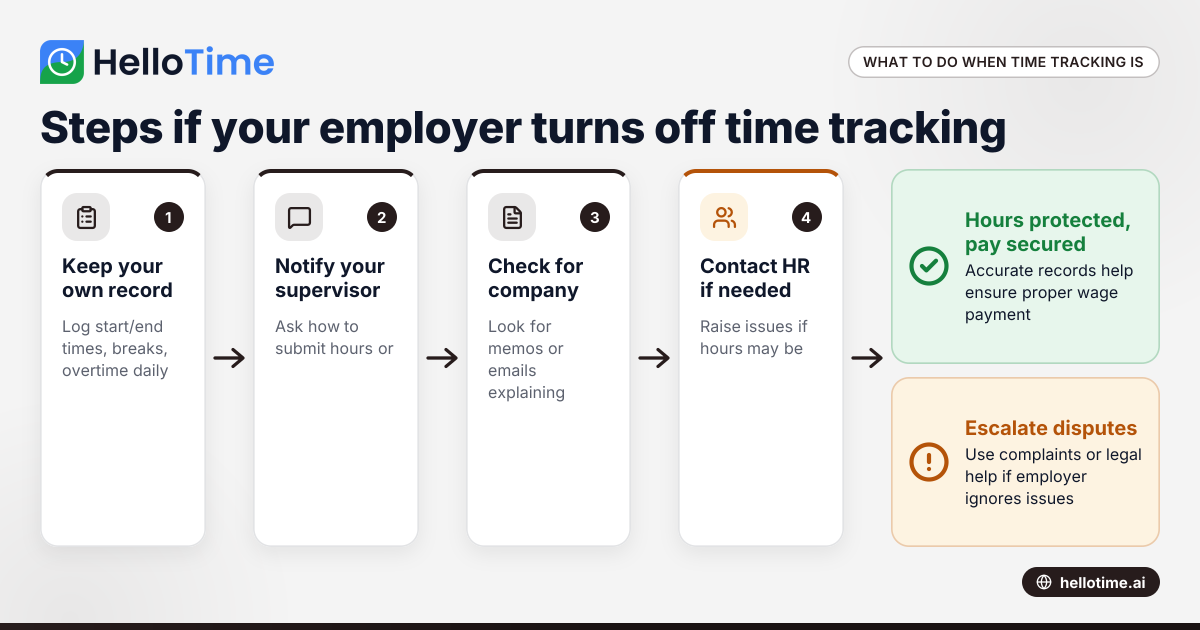
If your employer has turned off time tracking, follow these steps:
- Keep your own record: Note your start and end times, breaks, and any overtime worked daily. Use a physical notebook or a personal time-tracking app.
- Notify your supervisor: Ask how you should submit your hours or if there’s a new system coming.
- Check company communications: Look for memos or emails explaining the change.
- Contact HR if necessary: If you don’t get clear guidance or you feel your hours won’t be paid properly, raise the issue with your Human Resources department.
- Know your rights: Familiarize yourself with the FLSA and your state’s labor laws about wage payment and timekeeping.
- Seek legal advice: If unpaid wages are at stake and your employer refuses to address the issue, consult a labor attorney or your state labor board.
How can I prove the hours I worked without employer time tracking?
You can prove hours worked without official tracking by maintaining detailed personal records such as handwritten logs, emails with timestamps, calendar entries, or communications showing work tasks and timing. Witness statements from colleagues can also help substantiate your claims.
Additionally, use digital tools on your phone or computer to record hours, such as calendar apps, notes, or even screenshots. If you use workforce management software like HelloTime, it can help with backup records when enabled. Even if your employer disables tracking temporarily, keeping independent records is key.
What are the risks if time tracking stops?
When time tracking stops, employees risk missing pay for hours worked or not having proof for overtime claims. Payroll errors or delays can occur without a reliable system. Employers may unintentionally or deliberately underreport hours, leading to wage theft or legal problems.
For managers and HR, turning off time tracking also risks lower workforce visibility and compliance issues with labor laws. Robust attendance and time tracking tools reduce these risks, promoting transparency.
How can businesses avoid problems when changing time tracking systems?
Employers transitioning or turning off time tracking should:
- Communicate any changes clearly and in advance.
- Provide alternative approved ways for employees to log hours.
- Train staff on new software or manual tracking procedures.
- Maintain records that comply with federal and state laws.
- Use time tracking and workforce management platforms like HelloTime to streamline transitions.
This approach helps avoid lost wages, legal claims, and employee dissatisfaction.
Does the "ai employer has" feature impact time tracking?
The ai employer has technology integrated in modern time tracking software can automate reminders for clocking in and streamline approvals. However, if an employer disables these AI-powered tools, manual tracking becomes necessary.
AI features in workforce management solutions improve accuracy and reduce disputes. If turned off, employees and employers must revert to less automated methods that rely more on manual inputs and oversight.
Can I request reactivation of time tracking or access to past records?
Yes, employees can request that their employer reactivate time tracking. They can also ask for access to time records for previous pay periods to verify hours worked. Employers are required by law to maintain accurate payroll records and should provide these if requested.
Making a written request ensures the issue is documented. If your employer refuses or ignores these requests, this may raise a compliance concern that you can escalate through HR or labor agencies.
How do I request reactivation of time tracking or past records?
To request reactivation or access, submit a clear, written request to your supervisor or HR department. Specify the dates or periods you want records for and ask when time tracking will resume. Keep copies of all correspondence to document your efforts to resolve the issue.
What if my employer ignores my disputes about no time tracking?
If your employer disregards your concerns about time tracking being turned off, keep thorough records and escalate the matter. This can involve filing a complaint with your state labor department or the U.S. Department of Labor's Wage and Hour Division.
Legal counsel is often helpful for contested wage claims. Document all communications and attempts to resolve the issue. Taking this approach protects your rights while pursuing a fair resolution.
What actions can I take if my employer ignores disputes about no time tracking?
Start by documenting all your communications and attempts to resolve the issue internally. If management or HR ignores your disputes, file a formal complaint with your state labor board or the U.S. Department of Labor. Consulting a labor attorney may help address wage or compliance violations effectively.
For reliable, user-friendly time tracking with easy approvals, scheduling, GPS clock-in, and invoicing features, explore HelloTime’s features and see which plan fits your business needs at pricing.
Frequently asked questions
Is it legal for my employer to stop using time tracking software?
Yes, employers can change their time tracking methods, but they must still pay you accurately for all hours worked under federal law. Disabling a time tracking system does not exempt them from wage laws.
How do I protect myself if time tracking is turned off?
Keep a personal log of your start and end times, breaks, and overtime. Communicate with HR or supervisors and request clarification or alternate ways to report hours.
What can I do if I am not paid for hours worked because time tracking was off?
Contact HR first for resolution. If issues persist, file a complaint with your state labor office or the U.S. Department of Labor. Legal advice can be important for complex wage disputes.
Does disabling time tracking affect overtime pay?
No. Under the FLSA, employers must pay overtime for eligible employees regardless of how time is recorded. Accurate records are essential to enforce these rights.
Are there any software tools that help when my employer turns off time tracking?
Yes, employees can use personal time tracking apps or request employer-approved software like HelloTime that supports manual entries, GPS clock-ins, and detailed reporting.
How can I verify my hours if my employer refuses to provide time records?
Use personal documentation such as emails, notes, calendars, and statements from coworkers. Keep detailed notes daily to create an accurate record of your working hours.
This information offers general guidance on handling situations where an employer has turned off time tracking. It is not legal advice. Consult a qualified labor attorney or your state labor agency for specific issues related to unpaid wages or compliance.
Read next
This article covers one part of a bigger topic. For the complete picture, read our guide to employer has turned.
Keep reading
Related articles
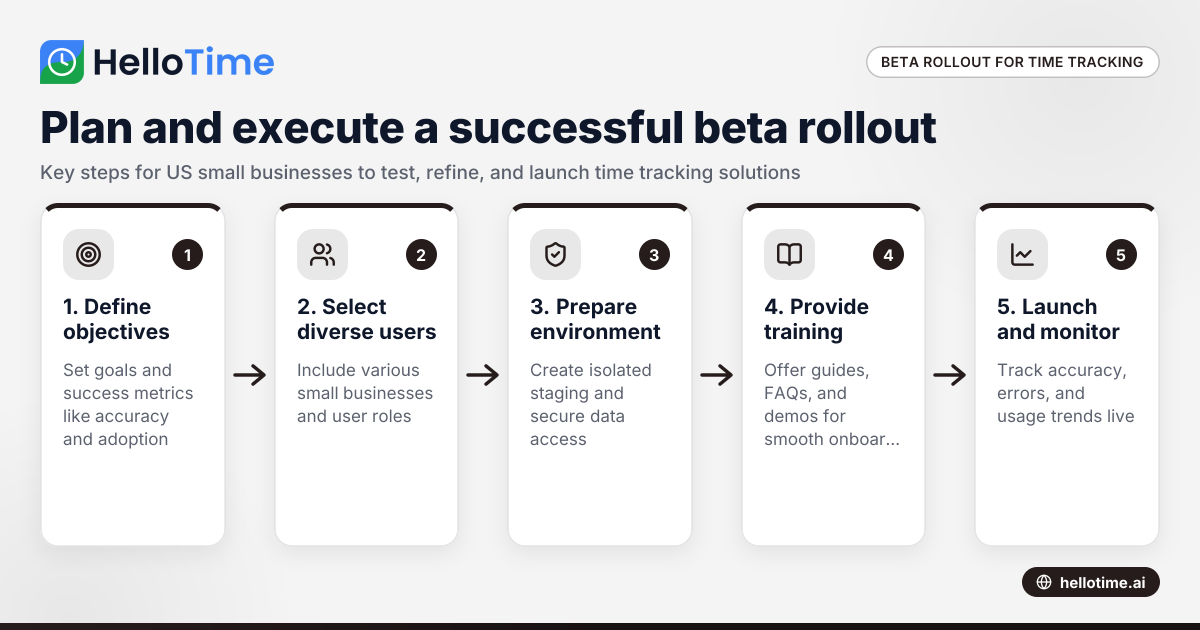
How to Plan and Execute a Successful Beta Production Rollout for Time Tracking Software in United States Small Businesses
Launching a beta production rollout means releasing your time tracking software to a limited group of real users in live conditions before full.
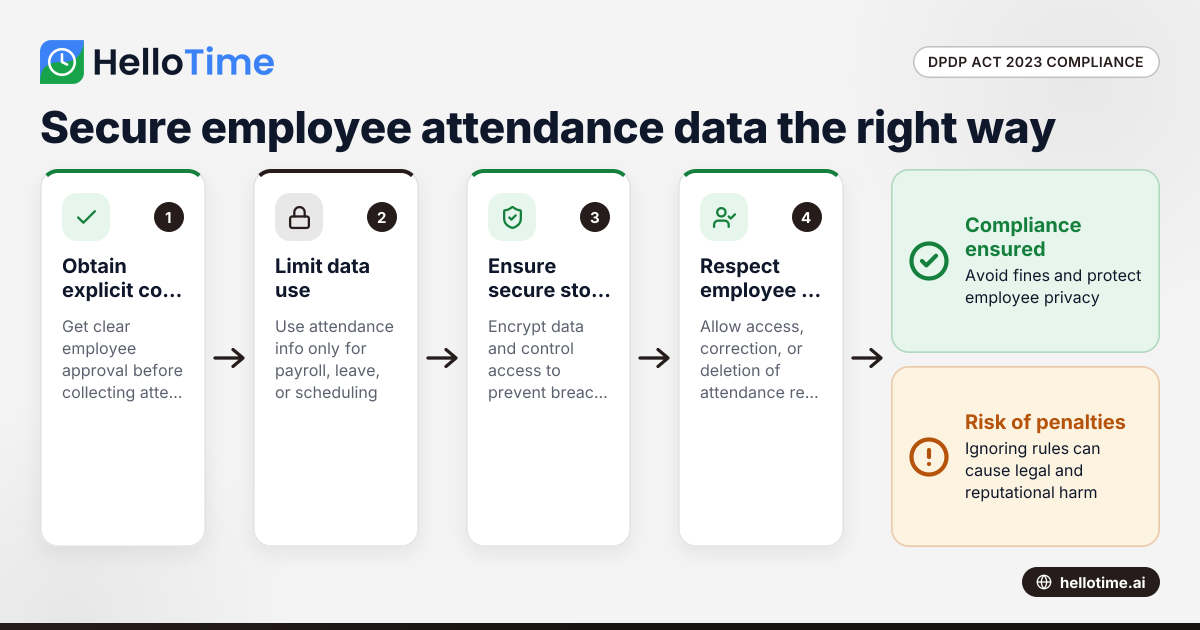
How the DPDP Act 2023 Impacts Employee Attendance and Timesheet Data Management in Indian SMEs
The Digital Personal Data Protection (DPDP) Act 2023 is India’s law regulating how personal data, including employee attendance information, must be.
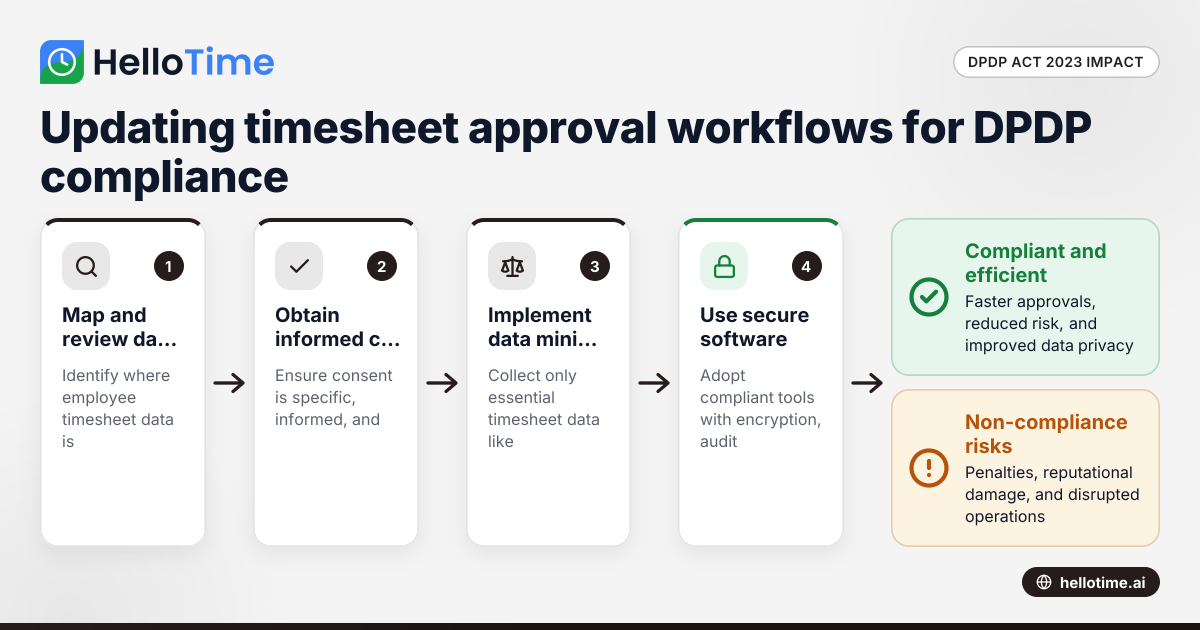
How the DPDP Act 2023 Affects Timesheet Approval Workflow for Manufacturers in Maharashtra, India
How the DPDP Act 2023 Affects Timesheet Approval Workflow for Manufacturers in Maharashtra, India The Digital Personal Data Protection (DPDP) Act 2023